

Even as passkeys and biometric sign-ins become more common, nearly every service still relies on a password somewhere in the process—email, banking, social media, health portals, streaming, work accounts, and device logins.
Most people, however, don’t realize the many ways we make our accounts vulnerable due to weak passwords, enabling hackers to easily crack them. In truth, password security isn’t complicated once you understand what attackers do and what habits stop them.
In this guide, we will look into the common mistakes we make in creating passwords and offer tips on how you can improve your password security. With a few practical changes, you can make your accounts dramatically harder to compromise.
Password security basics
Modern password strength comes down to three truths. First, length matters more than complexity. Every extra character multiplies the number of guesses an attacker must make. Second, unpredictability matters because attack tools prioritize the most expected human choices first. Third, usability matters because rules that are painful to follow lead to workarounds like reuse, tiny variations, or storing written passwords in unsafe ways. Strong password security is a system you can sustain, not a heroic one-time effort.
Protection that strong passwords provide
Strong passwords serve as digital barriers that are more difficult for attackers to compromise. Mathematically, password strength works in your favor when you choose well. A password containing 12 characters with a mix of uppercase letters, lowercase letters, numbers, and symbols creates over 95 trillion possible combinations. Even with advanced computing power, testing all these combinations requires substantial time and resources that most attackers prefer to invest in easier targets.
This protection multiplies when you use a unique password for each account. Instead of one compromised password providing access to multiple services, attackers must overcome several independent security challenges, dramatically reducing your overall risk profile.
Benefits of good password habits
Developing strong password security habits offers benefits beyond protecting your accounts. These habits contribute to your overall digital security posture and create positive momentum for other security improvements, such as:
- Reduced attack success: Strong, unique passwords make you a less attractive target for cybercriminals who prefer easier opportunities.
- Faster recovery: When security incidents do occur, good password practices limit the scope of damage and accelerate recovery.
- Peace of mind: Knowing your accounts are well-protected reduces anxiety about potential security threats.
- Professional credibility: Good security habits demonstrate responsibility and competence in professional settings.
- Family protection: Your security practices often protect family members who share devices or accounts.
The impact of weak passwords
On the other hand, weak passwords are not just a mild inconvenience. They enable account takeovers and identity theft, and can become the master key to your other accounts. Here’s a closer look at the consequences:
Your digital identity becomes someone else’s
Account takeover happens when cybercriminals gain unauthorized access to your online accounts using compromised credentials. They could impersonate you across your entire digital presence, from email to social media. For instance, they can send malicious messages to your contacts, make unauthorized purchases, and change your account recovery information to lock you out permanently.
The effects of an account takeover can persist for years. You may discover that attackers used your accounts to create new accounts in your name, resulting in damaged relationships and credit scores, contaminated medical records, employment difficulties, and legal complications with law enforcement.
The immediate and hidden costs of financial loss
Financial losses from password-related breaches aren’t limited to money stolen from your accounts. Additional costs often include:
- Bank penalty fees from overdrawn accounts
- Needing to hire credit monitoring services to prevent future fraud
- Legal fees for professional help resolving complex cases
- Lost income from time spent dealing with fraud resolution
- Higher insurance premiums due to damaged credit
The stress and time required to resolve these issues also affect your overall well-being and productivity.
Your personal life becomes public
Your passwords also guard your personal communications, private photos, confidential documents, and intimate details about your life. When these barriers fail, you could find your personal photos and messages shared without consent, confidential business information in competitors’ hands. The psychological, emotional, and professional impact of violated trust can persist long after the immediate crisis passes.
15 tips for better password security: Small steps, big impact
You can dramatically improve your password security with relatively small changes. No need to invest in expensive or highly technical tools to substantially improve your security. Here are some simple tips for better password security:
1) Long passwords are better than short, “complex” passwords
If you take away only one insight from this article, let it be this: password length is your biggest advantage. A long password creates a search effort that brute force tools will take a long time to finish. Instead of trying to remember short strings packed with symbols, use passphrases made of several unrelated words. Something like “candle-river-planet-tiger-47” is both easy to recall and extremely hard to crack. For most accounts, 12–16 characters is a solid minimum; for critical accounts, longer is even better.
2) Never reuse passwords
Password reuse is the reason credential stuffing works. When one site is breached, attackers immediately test those leaked credentials on other services. If you reuse those credentials, you have effectively given the keys to your kingdom. Unique passwords can block that entry. Even if a shopping site leaks your password, your email and banking stay protected because their passwords are different.
3) Don’t use your personal information
Attackers always try the obvious human choices first: names, birthdays, pets, favorite teams, cities, schools, and anything else that could be pulled from social media or public records. Even combinations that feel “creative,” such as a pet name plus a year, tend to be predictable to cracking tools. Your password should be unrelated to your life.
4) Avoid patterns and common substitutions
In the past, security experts encouraged people to replace letters with symbols such as turning “password” into “P@ssw0rd” and calling it secure. That advice no longer holds today, as attack tools catch these patterns instantly. The same goes for keyboard walks (qwerty, asdfgh), obvious sequences (123456), and small variations like “MyPassword1” and “MyPassword2.” If your password pattern makes sense to a human, a modern cracking tool will decipher it in seconds.
5) Use a randomness method you trust
Humans think they’re random, but they aren’t. We pick symbols and words that look good together, follow habits, and reuse mental templates. Two reliable ways to break that habit are using Diceware—an online dice-rolling tool that selects words from a list—and password generators, which create randomness better than your human brain. In addition, the variety of characters in your password impacts its strength. Using only lowercase letters gives you 26 possible characters per position, while combining uppercase, lowercase, numbers, and symbols expands this to over 90 possibilities.
6) Match password strength to account importance
Not every account needs the same level of complexity, but every account needs to be better than weak. For email, banking, and work systems, use longer passphrases or manager-generated passwords of 20 characters or more. For daily convenience accounts such as shopping or social media, a slightly shorter but still unique passphrase is fine. For low-stakes logins you rarely use, still keep at least a 12-character unique password. This keeps your accounts secure without being mentally exhausting.
7) Turn on multi-factor authentication where possible
Multi-factor authentication (MFA) adds a second checkpoint in your security, stopping most account takeovers even if your password leaks. Authenticator apps are stronger than SMS codes, which can be intercepted in SIM-swap attacks. Hardware or physical security keys are even stronger. Start with your email and financial accounts, then expand to everything that offers MFA.
8) Learn to spot phishing scams to prevent stolen passwords
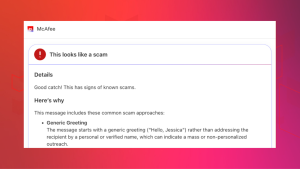
A perfect password is useless if you type it into the wrong place. Phishing attacks work by imitating legitimate login pages or sending urgent messages that push you to click. Build the habit of checking URLs in unsolicited emails or texts, being wary of pressure tactics, and taking a moment to question the message. When in doubt, open a fresh tab and navigate to the service directly.
9) Avoid signing in on shared devices
You may not know it, but shared computers may carry keyloggers, unsafe browser extensions, or saved sessions from other users. If you have no choice but to sign in using a shared device, don’t allow the browser to save your log-in details, log out fully afterward, and change the password later from your own device.
10) Be careful with public Wi-Fi
On public networks in places like such as cafes or airports, cybercriminals could be prowling for their next victim. Attackers sometimes create fake hotspots with familiar names to trick people into connecting. Even on real public Wi-Fi, traffic can be intercepted. The safest choice is to avoid logging into sensitive accounts on public networks. If you must use public Wi-Fi, protect yourself by using a reputable virtual private network and verify the site uses HTTPS.
11) Ensure your devices, apps, and security tools are updated
Many password thefts happen as a result of compromised devices and software. Outdated operating systems and browsers can contain security vulnerabilities known to hackers, leading to malware invasion, session hijacking, or credential harvesting. The best recourse is to set up automatic updates for your OS, browser, and antivirus tool to remove a huge chunk of risk with no additional effort from you.
12) Use a reputable password manager
Password managers solve two hard problems at once: creating strong unique passwords and remembering them. They store credentials in an encrypted vault protected by a master password, generate high-entropy passwords automatically, and often autofill only on legitimate sites (which also helps against phishing). In practice, password managers are what make “unique passwords everywhere” feasible.
13) Protect your password manager like it’s your digital vault
Among all others, your master password that opens your password manager is the one credential you must memorize. Make it long, passphrase-style, and make sure you have never reused it anywhere else. Then add MFA to the manager itself. This makes it extremely difficult for someone to get into your vault even if they somehow learn your master password.
14) Audit and update passwords when there’s a reason
The old “change every 90 days no matter what” guideline could backfire, leading to password-creation fatigue and encouraging people to make only tiny predictable tweaks. A smarter approach is to update only when something changes in your risk: a breach, a suspicious login alert, or a health warning from your password manager. For critical accounts, doing a yearly review is a reasonable rhythm.
15) Reduce your attack surface by cleaning up old accounts
Unused accounts are easy to forget and easy to compromise. Delete services you don’t use anymore, and review which third-party apps are connected to your Google, Apple, Microsoft, or social logins. Each unnecessary connection is another doorway you don’t need open.
Practical implementation strategies for passphrases
As mentioned in the tips above, passphrases have become the better, more secure alternative to traditional passwords. A passphrase is essentially a long password made up of multiple words, forming a phrase or sentence that’s meaningful to you but not easily guessed by others.
Attackers use sophisticated programs that can guess billions of predictable password combinations per second using common passwords, dictionary words, and patterns. But when you string together four random words, you create over 1.7 trillion possible combinations, even though the vocabulary base contains only 2,000 common words.
Your brain, meanwhile, is great at remembering stories and images. When you think “Coffee Bicycle Mountain 47,” you might imagine riding your bike up a mountain with your morning coffee, stopping at mile marker 47. That mental image sticks with you in ways that “K7#mQ9$x” never could.
The approach blending unpredictability and the human ability to remember stories offers the ideal combination of security and usability.
To help you create more effective passphrases, here are a few principles you can follow:
- Use unrelated words: Choose words that don’t naturally go together. “Sunset beach volleyball Thursday” is more predictable than “elephant tumbler stapler running” because the first phrase contains related concepts.
- Add personal meaning: While the words shouldn’t be personally identifiable, you can create a mental story or image that helps you remember them. This personal connection makes the passphrase memorable without making it guessable.
- Avoid quotes and common phrases: Don’t use song lyrics, movie quotes, or famous sayings. These appear in dictionaries and can be vulnerable to specialized attacks.
- The sentence method: Create a memorable sentence and use the first letter of each word, plus some numbers or punctuation. “I graduated from college in 2010 with a 3.8 GPA!” becomes “IgfCi2010wa3.8GPA!” This method naturally creates long, unique passwords.
- The story method: Create a memorable short story using random elements and turn it into a passphrase. “The purple elephant drove a motorcycle to the library on Tuesday” becomes “PurpleElephantMotorcycleLibraryTuesday” or can be used as-is with spaces.
- The combination method: Combine a strong base passphrase with site-specific elements. For example, if your base is “CoffeeShopRainbowUnicorn,” you might add “Amazon” for your Amazon account: “CoffeeShopRainbowUnicornAmazon.”
- Use mixed case: For maximum security, the mixed-case approach capitalizes on random letters within words: “coFfee biCycLe mouNtain 47.” This dramatically increases entropy while remaining typeable.
- Add symbols: When used sparingly, this technique adds complexity. You can separate the words or substitute some letters with random symbols. But make sure you will remember them.
- Use words from other languages: Multi-language passphrases offer a layer of security, assuming you’re comfortable with multiple languages. “Coffee Bicicleta Mountain Vier” combines English, Spanish, and German words, creating combinations that appear in no standard dictionary.
- Personalize it: For the security-conscious, consider adding random elements that hold personal meaning, as long as this information isn’t publicly available. It could be the coordinates of a special place or a funny inside story within your family.
Password managers: Your password vault
Password managers are encrypted digital vaults that store all your login credentials behind a single master password. They are your personal security assistant that never forgets, never sleeps, and constantly works to keep your accounts protected with unique, complex passwords.
Modern password managers create passwords that are truly random, combining uppercase and lowercase letters, numbers, and special characters in patterns that are virtually impossible for cybercriminals to guess or crack through brute force attacks. These passwords typically range from 12 to 64 characters long, exceeding what most people could realistically remember or type consistently.
Encryption scrambles your passwords
The encrypted format scrambles your passwords using advanced cryptographic algorithms before being saved. This means that even if someone gained access to your password manager’s servers, your actual passwords would appear as meaningless strings of random characters without the encryption key. Only you possess this key through your master password.
The auto-fill functionality also offers convenience, recognizing the login page of your account and instantly filling in your username and password with a single click or keystroke. This seamless process happens across operating systems, browsers, and devices—your computer, smartphone, and tablet—keeping your credentials synchronized and accessible wherever you need them.
Choose a reputable password manager
Selecting the right password manager requires careful consideration of several factors that directly impact your security and user experience.
The reputation and track record of the company offering the password manager should be your first consideration. Look for companies that have been operating in the security space for several years and have a transparent approach to security practices.
Reputable companies regularly undergo independent security audits by third-party cybersecurity firms to examine the password manager’s code, encryption methods, and overall security architecture. Companies that publish these audit results demonstrate transparency and commitment to security.
Also consider password managers that use AES-256 encryption, currently the gold standard for data protection used by government agencies and financial institutions worldwide. Additionally, ensure the password manager employs zero-knowledge architecture, meaning the company cannot access your passwords even if they wanted to.
Intuitive user interface, reliable auto-fill functionality, responsive customer support, and ease of use should be checked as well. A password manager that is confusing to navigate or constantly malfunctions will likely be abandoned, defeating the purpose of improved password security.
Choose a solution that offers other features aside from the basic password storage. Modern password managers often include secure note storage for sensitive information such as Social Security numbers, passport details, password sharing capabilities for family accounts, and dark web monitoring that alerts you if your credentials appear in data breaches.
Final thoughts
Strong password security doesn’t have to be complicated. Small changes you make today can dramatically improve your digital security. By creating unique, lengthy passwords or passphrases for each account and enabling multi-factor authentication on your most important services, you’re taking control of your online safety.
Consider adopting a reputable password manager to simplify the process while maximizing your protection. It’s one of the smartest investments you can make for your digital security.

Stay Updated
Follow us to stay updated on all things McAfee and on top of the latest consumer and mobile security threats.