

How AI uses simple details in your photos to pinpoint where you are and why that’s a gold mine for scammers
McAfee Labs Safer Summer Travel Report | Summer 2026
A Photo Is Worth a Thousand Data Points
You just got back from a week in Central America. You posted a few shots: the colorful streets of Tulum, a picture of the ancient ruins of Tikal, a close-up of your shrimp tacos. No location tag. No caption naming the city. Just a good photo.
A few days later, you get a message. It references your bank. It mentions suspicious activity “while traveling internationally.” It feels oddly specific, with details about where you were and when. It feels real.
These types of personalized scam messages are a growing tactic. And your own photos may have helped write it.
McAfee Labs set out to understand exactly how much location information exists inside an ordinary travel photo, and what that means for the roughly 244 million Americans who travel each year.
What we found should change the way you think about what you share online: Some AI models have a more than 90% accuracy rate at detecting the location a photo was taken based on the visuals in the photo alone. And critically, that level of accuracy is now achievable using tools that are free and widely accessible.
That’s why we’ve built tools like McAfee’s Scam Detector that are designed to help spot these kinds of highly targeted, convincing messages before they lead to costly mistakes.

What We Tested And Why
The question McAfee Labs wanted to answer was deceptively simple: Can AI look at a travel photo and figure out where it was taken, even without GPS data or location tags?
Not metadata. Not embedded coordinates. Just the image itself: the background, the architecture, the signage, the light; the visual context that any photo naturally captures.
To find out, we built an automated testing pipeline and ran it against a dataset of 21,236 travel images sourced from publicly available image sets. We also conducted a separate, more controlled review of 102 additional images to pressure-test our findings.
We tested two publicly available, large-scale AI vision models that are both freely available. Neither required special access, proprietary data, or advanced technical expertise to run. We used the same tools a scammer could access today.
Each image was analyzed using a consistent automated prompt asking the model to identify the location depicted (city, country, or region) based solely on visual content. Results were then reviewed by human analysts to validate accuracy and flag edge cases.
What We Found: AI Has a Whopping 91% Accuracy Rate
The results were striking.
Gemma3 27B correctly identified the city and country of a travel photo 87% of the time. Qwen3 VL 30B performed even better, reaching 91% accuracy across the same dataset.
That means in roughly 9 out of 10 cases, an AI model that’s available for free, to anyone, could look at an ordinary travel photo and correctly name where it was taken. This kind of analysis is also how AI tools understand images more broadly, shaping not just scams, but how information shows up in AI-powered answers.
And when the exact city wasn’t identified, the country alone was almost always correct. For a scammer, that’s more than enough. It’s also enough to turn a vague, generic scam into one that feels specific, timely, and believable.
What Makes a Photo Easy to Place?
Certain types of images were identified with even higher confidence:
- Photos featuring famous landmarks or recognizable skylines
- Images taken in popular tourist destinations with distinctive visual signatures
- Photos with visible signage, unique street markings, or local architecture
- Images that captured cultural context: transportation, storefronts, food stalls
Less recognizable scenery, like a generic beach, a rural road, or a hotel room, lowered accuracy. But even in those cases, country-level identification remained high.
We Tried it. And We Were Spooked.
To illustrate how simple this was to replicate, we moved outside of McAfee’s labs and asked our less-technical colleagues to try it themselves. No research background required. No special tools.
Employees uploaded their own personal travel photos, images pulled straight from their camera rolls and never posted publicly, to ChatGPT, Claude, and Copilot, and simply asked each one to identify where the photo was taken.
The results made people uncomfortable.
Accuracy dropped compared to our controlled lab tests. But not by much. The models still correctly identified country-level location at a rate that would be more than enough for a scammer to craft a convincing, targeted message.
The takeaway isn’t that AI has “seen” your photos somewhere before. It’s that a photograph inherently contains an enormous amount of locating information, in the architecture, the light, the signage, the landscape, simply by virtue of existing in the world. You don’t need to geotag a photo for it to give away where you’ve been.
See It for Yourself
The following section shows real examples of AI geo-location detection in action, using personal travel photos submitted by our research team. No location tags. No metadata. Just the image and what AI found in it.
We started with somewhat recognizable structures in the background, and then tried increasingly more obscure backgrounds, trying to reduce faces and backgrounds to foliage only. This is what happened:
Example 1
Brooke’s honeymoon pictures: This example features a more prominent landmark, helping AI determine the location specifically. When there’s something recognizable, AI really recognizes it, down to giving you the exact spot on the map you’re at, the history of the location, and tourist information.

Example 2
Sandra’s sunset photo: This example gets more difficult for AI by removing major landmarks and people. ChatGPT was still able to correctly identify the location as Hastings-on-Hudson.


Example 3
Rob’s close-up shot of flowers: Just the close-up image of these tulips was enough for Claude to accurately detect that this photo was taken at Keukenhof gardens in the Netherlands.

How a Photo Becomes a Scam
Knowing where someone is or where they’ve recently been is one of the oldest tricks in a scammer’s playbook. But until recently, getting that information required either knowing the person or getting lucky.
AI removes the guesswork, allowing attackers to build highly specific, contextual scams at scale.
With geo-location inference this accurate, scammers no longer need to cast a wide net and hope a generic phishing message lands. Instead, they can use publicly shared photos to build a believable context around an attack:
- “We detected unusual account activity while you were traveling in [city].”
- “Your card was flagged for a transaction in [country] — please verify immediately.”
- “Hi, we’re reaching out regarding your recent stay at a hotel in [destination].”
- “Hi, it’s [your name], I’m in Mexico and all my cards are being declined. Could you send me $$?” (a message targeting your friends or loved ones)
- “We noticed a login attempt from your location in [destination] — please confirm your identity.”
- “Your reservation in [city] requires reconfirmation — click here to secure your booking.”
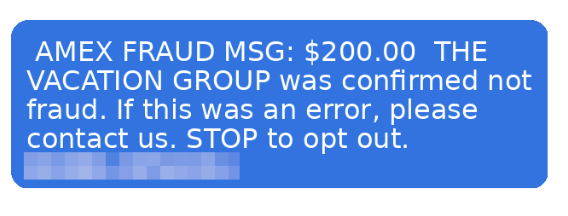
These messages don’t need to be perfectly accurate. They just need to feel plausible and close enough. That is the entire strategy. Familiarity lowers skepticism. Skepticism is what protects you.
This is what turns mass phishing into hyper-personalized phishing at scale, and it’s why even cautious, digitally savvy travelers are getting caught.
The Scammer’s New Workflow
Here’s how straightforward this pipeline can become:
- Find publicly shared travel photos on Instagram, Facebook, or X, no hacking required
- Run them through a freely available AI vision model
- Identify the likely destination, timeframe, and context
- Craft a targeted message referencing that location
- Send it during or shortly after the travel window, when the victim is most likely to believe it
Steps 1 through 5 can be automated. The whole process scales easily. And the resulting messages feel personal in a way that generic scams never could.
The Broader Scam Landscape Travelers Face
Geo-location inference doesn’t exist in a vacuum. It’s one tool in a growing arsenal that scammers deploy specifically against travelers.
Travelers are operating outside their normal routines, using unfamiliar networks, and making quick financial decisions under time pressure. These behaviors are exactly what make photo-based location inference more actionable for scammers.
New McAfee consumer research found that more than 1 in 3 Americans have encountered a travel-related cyberthreat, and 41% of those impacted lost money, often exceeding $500. At the same time, rising travel costs and time pressure are pushing people toward faster, riskier decisions. Those are exactly the conditions scammers are built to exploit.
The data reveals just how exposed travelers make themselves without realizing it. Nearly two-thirds of Americans connect to public Wi-Fi while traveling (63%), and a similar share scan QR codes without verifying where they lead (62%). Almost half use airport Wi-Fi specifically (49%), and 41% admit to trusting travel-related messages without checking the sender. One in five logs into financial apps while on public networks, and the same group shares travel plans in real time on social media. Twenty percent click travel-related links without verifying the source first. And finally, around 1 in 5 (22%) admit to sharing travel plans in real time.
That last behavior is worth pausing on. Sharing travel plans in real time, on public or semi-public social accounts, is precisely what creates the photo-based location signals this research examines. These behaviors and geo-location exposure are not separate issues. They feed each other.
Location inference is the key that makes all of those existing vulnerabilities more exploitable. A scammer with a rough idea of where you are does not just have a data point. They have a script.
Methodology: How We Conducted This Research
Transparency matters. Here is exactly how this research was conducted.
Dataset: 21,236 travel images that are publicly available for research, plus a separate controlled set of 102 images contributed by McAfee internal volunteers (never previously posted publicly).
Models tested:
- Gemma3 27B — a multi-model and vision-language model from Google DeepMind
- Qwen3 VL 30B — a multi-model and vision-language model from Alibaba’s Qwen team
It’s important to note that we conducted our testing using large language models running locally on our own computers, rather than through public services such as ChatGPT.
This more closely reflects how an attacker might operate at scale. Running models locally allows unrestricted, automated generation of large volumes of malicious content without relying on a third-party provider.
By contrast, cloud-based AI services typically monitor for abuse and may impose rate limits, suspend accounts, or block requests when they detect activity associated with phishing or other malicious behavior.
Process: An automated Python script submitted each image to both models using a standardized prompt requesting location identification based solely on visual content. No metadata, EXIF data, or file naming conventions were used as inputs. Results were logged programmatically.
Validation: Image labels were pre-assigned prior to analysis. In cases where geographic names or landmarks could reasonably be interpreted in more than one way, a human reviewer compared the pre-labeled locations and model outputs to ensure consistent categorization.
For example, the reviewer determined whether Vatican City should be grouped with Rome and whether “Washington D.C.” and “Washington, D.C.” should be treated as the same location. The reviewer did not alter either the original labels or the model results, but instead applied judgment to reconcile ambiguous naming conventions and edge cases.
Accuracy definition: A result was counted as correct when the model identified the correct city and country. Country-only identification was tracked separately. Both metrics are reported.
What this research does not claim: This research does not suggest that every travel photo will be correctly identified, or that all publicly available AI tools perform at this level. Results varied by image type, landmark density, and geographic region. The point is not perfect identification, it’s that accuracy is high enough, and accessible enough, to enable targeted scams at scale.
About the Consumer Research McAfee commissioned a consumer survey fielded in March 2026 examining travel intentions, travel scam experiences and perceptions, and digital behaviors while traveling. Results referenced here represent a subset of 1,000 U.S. adults over the age of 18. The full study included responses from 6,000 participants across Australia, France, Germany, Japan, the United States, and the United Kingdom.
How to Protect Yourself
Knowing the risk exists is the first step. Here’s what to actually do about it.
Think before you post, especially in real time. The highest-risk window is when you’re still traveling. Posting while you’re in a location gives scammers a live signal. When possible, post after you’ve returned home or delay sharing location-identifiable content by a few days.
Audit your social media privacy settings. Photos shared publicly are the easiest targets. Restricting your posts to people you know significantly limits the pool of images that can be scraped and analyzed.
Be skeptical of urgency tied to your location. If a message references where you’ve been, even correctly, treat that as a red flag, not a credibility signal. Scammers use location familiarity precisely because it feels reassuring.
Go directly to the source. If you receive a message claiming to be from your bank, airline, hotel, or card provider while traveling, don’t click any link in the message. Open a new browser tab and navigate directly to the company’s official website, or call the number on the back of your card.
Use a travel-specific email or alias. Some travelers use a separate email address for bookings, reservations, and travel apps. This limits the cross-referencing scammers can do between your social media presence and your financial accounts.
Trust the skepticism, not the familiarity. Modern scams are designed to feel familiar before they feel suspicious. If something creates a sense of urgency around your financial accounts while you’re traveling, slow down. The pressure itself is the warning sign.
How McAfee Protects You Before, During, and After Travel
As prices rise and decisions happen in real time, it’s easy to prioritize convenience over caution. But that’s exactly the moment when small checks matter most.
| Stage of Travel | What’s Happening | How McAfee Helps |
| Before You Book | Comparing deals, clicking promotions, booking flights and hotels under time pressure | Scam Detector checks links, messages, and booking sites before you click, helping you avoid fake deals and scam listings |
| During Your Trip | Connecting to public Wi-Fi, scanning QR codes, receiving travel updates and alerts | VPN helps secure your connection on public Wi-Fi, while Scam Detector flags suspicious messages and unsafe links in real time |
| After Your Trip | Accounts remain active, travel data stored across platforms, potential exposure from breaches | Identity Monitoring alerts you if your personal information appears online, helping you act quickly before damage spreads |
With McAfee+ Advanced, multiple layers work together so you’re not left figuring it out after the damage is done.
So you can focus on your trip, and not on whether that notification is a scam.
Final Thought
A travel photo is a memory. It’s also, increasingly, a data point.
That doesn’t mean you should stop sharing your experiences. It means understanding that the same visual richness that makes a great photo is exactly what AI systems are trained to read.
Scammers know this. Now you know how to protect yourself.
This report was produced by McAfee Labs. Research was conducted in 2025–2026 as part of McAfee’s ongoing monitoring of AI-enabled scam vectors.
Stay Updated
Follow us to stay updated on all things McAfee and on top of the latest consumer and mobile security threats.