

You’re comparing airfare on your phone, watching prices climb by the hour, when a deal pops up that feels just good enough to grab. The timer’s ticking. The price looks right. You don’t want to miss it.
You’re comparing airfare on your phone, watching prices climb by the hour, when a deal pops up that feels just good enough to grab. The timer’s ticking. The price looks right. You don’t want to miss it.
That moment, when you’re rushing to lock something in, is exactly where scams thrive.
New McAfee research shows that more than 1 in 3 Americans have encountered a travel-related cyberthreat, and 41% of those impacted lost money, often exceeding $500.

At the same time, rising travel costs and time pressure are pushing people to make faster, riskier decisions. Those are the exact conditions scammers rely on.
That’s where protection has to show up earlier.
McAfee’s Scam Detector lets you check suspicious links, messages, and booking sites before you click, so you can pause and verify instead of giving scammers the edge.

Travel Scams, Red Flags, and How McAfee Protects You
| Travel Scam Type | Key Red Flags | How McAfee Helps |
| Fake travel deals | Prices far below market, pressure to “book now,” sites you’ve never heard of | Scam Detector flags suspicious links and explains why they’re risky, so you can avoid fake deals before you book |
| Fake booking confirmations | Unexpected messages about bookings you didn’t make, mismatched sender details | Scam Detector analyzes messages before you engage, helping you avoid fake confirmations |
| Fake airline/hotel websites | Slight URL changes, poor design, being pushed to pay immediately or off-platform | Safe Browsing helps block risky sites before you enter payment details, reducing the chance of fraud |
| Payment requests outside platforms | Asked to pay via wire transfer, crypto, or direct payment instead of official platforms | Scam Detector flags suspicious payment requests, helping you avoid sending money to scammers |
| QR code scams | QR codes posted in public with no clear source or context | Scam Detector checks QR links before they open, so you don’t land on malicious sites |
| Customer service impersonation | Calls or messages asking for login credentials or payment info | Scam Detector detects deepfake AI audio impersonation attempts, helping you avoid sharing sensitive information |
| AI-generated listings | Photos that look overly polished, details that don’t quite match up | Scam Detector identifies suspicious content patterns, helping you spot listings that aren’t real |
| Public Wi-Fi attacks | Open networks with no password or security prompts | VPN helps protect your data on public networks, keeping your personal information private |
The Findings From Our 2026 Travel Research
McAfee Labs found that many travel scams work because they look familiar and spread fast.
TripAdvisor was the most commonly impersonated travel app, cloned at roughly three times the rate of other major platforms like Kayak, Expedia, and Booking.com.
In some cases, thousands of scam detections traced back to just a handful of fake apps, showing how quickly a convincing scam can take off when travelers are racing to book.
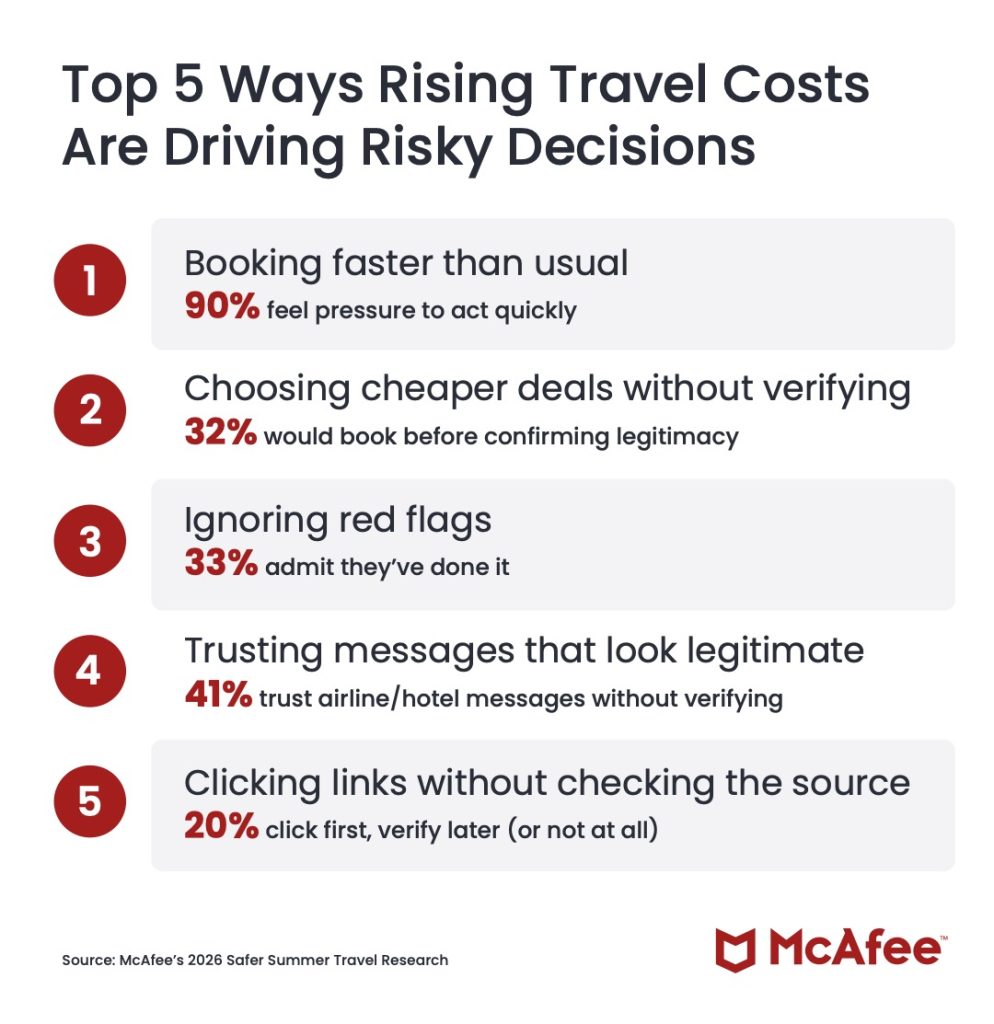
Top 5 Ways Rising Travel Costs Are Driving Risky Decisions
Our 2026 travel survey shows how rising prices and last‑minute pressure are changing traveler behavior, often in ways scammers exploit.
1. Booking faster than usual
90% feel pressure to act quickly
2. Choosing cheaper deals without verifying
32% would book before confirming legitimacy
3. Ignoring red flags
33% admit they’ve done it
4. Trusting messages that look legitimate
41% trust airline/hotel messages without verifying
5. Clicking links without checking the source
20% click first, verify later (or not at all)
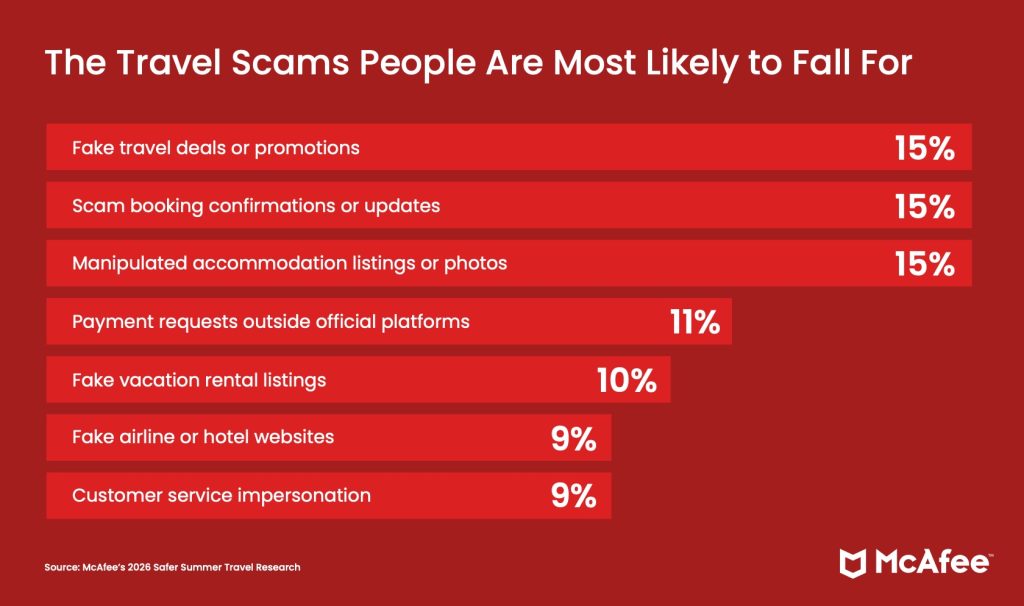
The Travel Scams People Are Most Likely to Fall For
According to our consumer survey findings, those who reported falling for a travel scam said these were the methods scammers used to trick them:
1. Fake travel deals or promotions (15%)
2. Scam booking confirmations or updates (15%)
3. Manipulated accommodation listings or photos (15%)
4. Payment requests outside official platforms (11%)
5. Fake vacation rental listings (10%)
6. Fake airline or hotel websites (9%)
7. Customer service impersonation (9%)
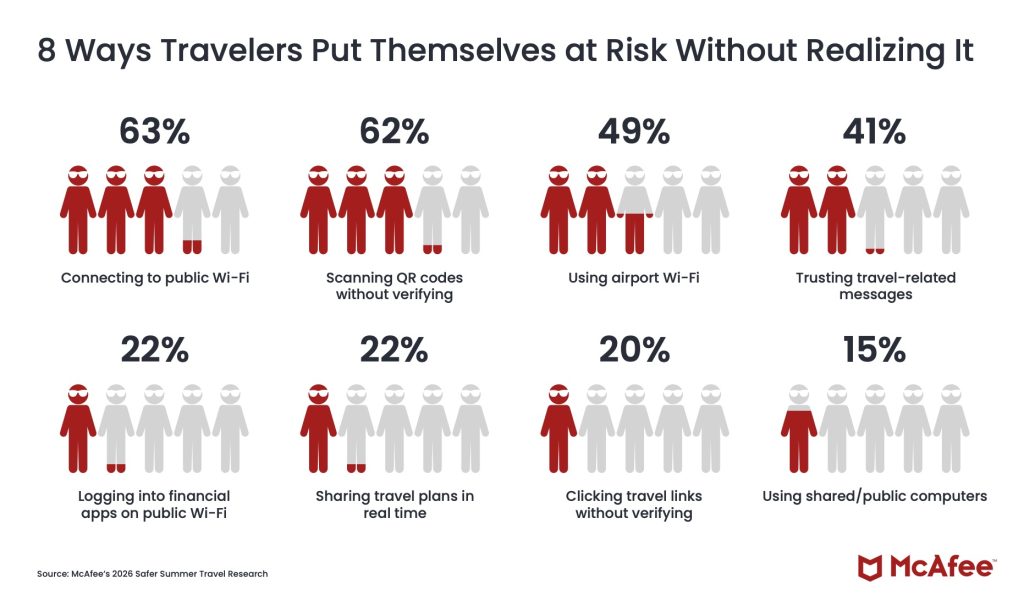
8 Ways Travelers Put Themselves at Risk Without Realizing It
These common traveler behaviors are popular avenues for criminals to steal your information, data, and money.
1. Connecting to public Wi-Fi (63%)
2. Scanning QR codes without verifying (62%)
3. Using airport Wi-Fi (49%)
4. Trusting travel-related messages (41%)
5. Logging into financial apps on public Wi-Fi (22%)
6. Sharing travel plans in real time (22%)
7. Clicking travel links without verifying (20%)
8. Using shared/public computers (15%)
How McAfee Protects You Before, During, and After Your Trip
As prices rise and decisions happen in real time, it’s easy to prioritize convenience over caution. But that’s exactly the moment when small checks matter most.
| Stage of Travel | What’s Happening | How McAfee Helps |
| Before You Book | Comparing deals, clicking promotions, booking flights and hotels under time pressure | Scam Detector checks links, messages, and booking sites before you click, helping you avoid fake deals and scam listings |
| During Your Trip | Connecting to public Wi-Fi, scanning QR codes, receiving travel updates and alerts | VPN helps secure your connection on public Wi-Fi, while Scam Detector flags suspicious messages and unsafe links in real time |
| After Your Trip | Accounts remain active, travel data stored across platforms, potential exposure from breaches | Identity Monitoring alerts you if your personal information appears online, helping you act quickly before damage spreads |
With McAfee+ Advanced, multiple layers work together so you’re not left figuring it out after the damage is done.
Spend more time on your vacation, and less time worrying about scammers who want your vacation fund.
Stay Updated
Follow us to stay updated on all things McAfee and on top of the latest consumer and mobile security threats.