

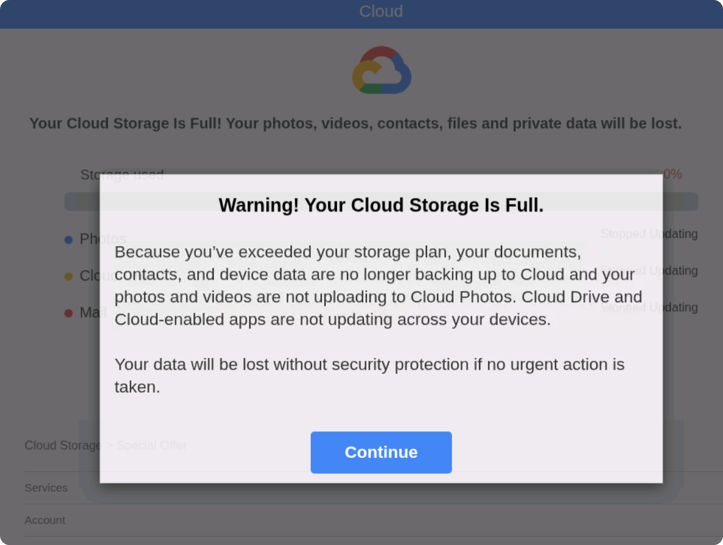
You open your inbox and see it: Your cloud storage is full.
There’s a warning about photos being deleted, your account being suspended, or a renewal failing. There’s a button to “fix it now.” Or a warning to “act today.”
It looks routine. Maybe even urgent enough to click.
That’s exactly the point.
Cloud storage scams are making headlines again, building on patterns we flagged earlier this year in our State of the Scamiverse research.
These emails have circulated steadily since 2025, often impersonating trusted brands like Apple, Microsoft, and Google. Many are timed to moments when people are already thinking about storage, backups, or subscriptions.
The safest move is simple: pause and don’t click. If there’s a real issue, go directly to your account through the official app or website.
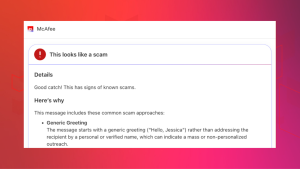
You can also protect yourself with McAfee’s Scam Detector, which flags suspicious links and messages, including cloud storage scams, and explains why they may be risky.

What Is A Cloud Storage Scam And How Does It Work?
Cloud storage scams are phishing attacks designed to trick you into believing there’s an issue with your account so you’ll click a malicious link.
They often look like this, and include 3 key red flags:
- Messages that create urgency like “act now or lose your data”
- Generic greetings instead of your name
- Links that don’t match the official domain
How the scam works (step-by-step)
| Step | What happens | What to do | How McAfee helps |
| 1. You receive a message | Email or text claims your storage is full or your account has an issue | Don’t click links directly from the message | Scam Detector flags suspicious messages before you interact |
| 2. Urgency is introduced | Warning that files or photos will be deleted if you don’t act | Pause. Urgency is a red flag | Scam Detector identifies pressure-based scam patterns |
| 3. You’re pushed to a link | Link mimics a real login or billing page | Go directly to the official website instead | Safe browsing tools help block malicious sites |
| 4. You’re asked for info | Login credentials or payment details requested | Never enter info from a link you didn’t verify | Scam Detector explains why a page or link is risky |
| 5. Data is captured | Scammers collect your data or payment | Monitor accounts and report suspicious activity | Identity monitoring alerts you if your data is exposed |
Why This Scam Works
- Familiar brands: Messages often appear to come from trusted platforms like Apple iCloud or Google Drive
- Emotional pressure: The threat of losing photos or files triggers quick decisions
- Routine context: Storage alerts feel normal, so people don’t question them
And that, my friends, is scam number one in this week’s This Week in Scams.
Let’s get into what else is on our radar.
FBI Report: Over $20 Billion Lost to Scams in 2025
New data from the FBI’s Internet Crime Complaint Center (ICC) shows just how large the scam economy has become.

In 2025 alone:
- Americans reported over $20.8 billion in losses
- More than 1 million complaints were filed
- That’s roughly 3,000 complaints per day

This is where layered protection matters. It’s not just about catching one bad link. It’s about recognizing patterns across messages, platforms, and moments when something feels slightly off.
How McAfee Protects You From Scams and Cyber Threats
McAfee+ Advanced gives you multiple layers working together so you are not left figuring it out after the damage is done:
- Identity Monitoring alerts you if your personal info shows up where it should not, so you can act fast
- Personal Data Cleanup helps remove your information from data broker sites, making you harder to target in the first place
- Scam Detector flags suspicious texts, emails, links, and even deepfake videos before you engage
- Safe Browsing helps block risky sites if you do click
- Device Security helps detect malicious apps or downloads
- Secure VPN keeps your data private, especially on public Wi-Fi
McAfee Safety Tips This Week
As always, we have some best practices and safety tips for navigating life online:
- Pause before clicking, especially when a message creates urgency
- Go directly to websites or apps instead of using email links
- Be skeptical of routine account alerts that push immediate action
- Double-check sender addresses and URLs closely
- Use tools like McAfee’s Scam Detector to flag suspicious links and messages before interacting
- Turn on identity monitoring so you’re alerted if your data is exposed
And we’ll be back next week with more scams making headlines.
Stay Updated
Follow us to stay updated on all things McAfee and on top of the latest consumer and mobile security threats.