

Scam messages are getting smarter and faster.
According to McAfee’s 2026 State of the Scamiverse report, Americans now spend 114 hours a year trying to figure out what’s real and what’s fake online. That’s nearly three full workweeks lost to second-guessing messages, alerts, and links.
And when scams do succeed, they move quickly. The typical scam unfolds in about 38 minutes, leaving little room for hesitation.
That creates a gap: People want to check before they act, but the tools haven’t always met them in that moment.
ChatGPT + McAfee is designed to close that gap, bringing scam detection directly to a platform people are already using to ask questions and make decisions.
And it’s available to anyone. You don’t have to be a McAfee subscriber.
This isn’t just detection. It’s guidance in the exact moment you’re deciding what to do.
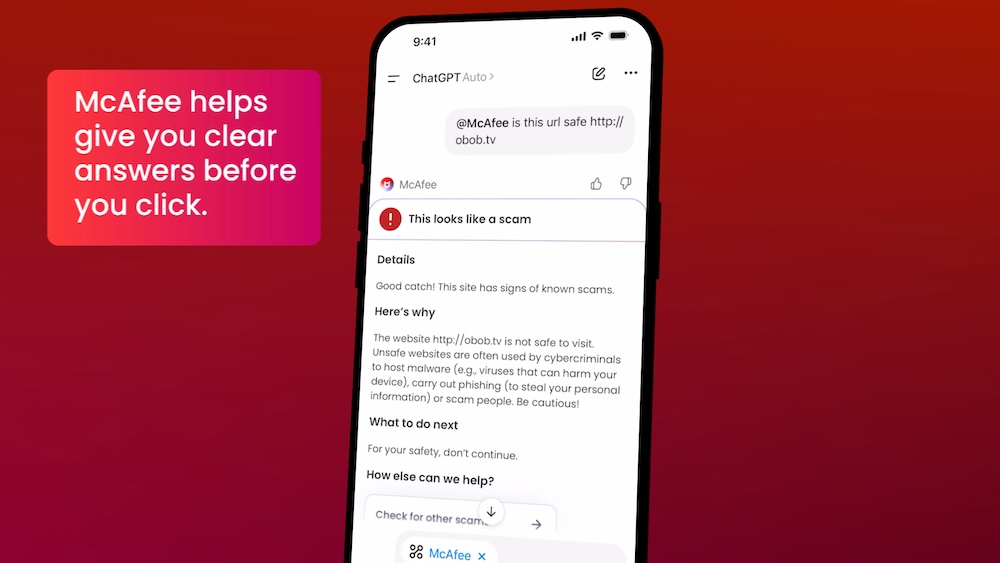
Instead of guessing, you can paste a message or drop in a screenshot and get a clear explanation of what’s risky, and what to do next, powered by McAfee’s threat intelligence.

What You Can Do with ChatGPT + McAfee
With this integration, checking something suspicious becomes as simple as asking a question.
Paste a message. Drop in a link. Upload a screenshot.
McAfee analyzes it and explains what’s going on clearly and in context.
Here’s how it works:
| Feature | What it does | How it protects you |
| Link safety check | Paste a suspicious URL and get a reputational analysis based on McAfee threat intelligence | Scam links are often designed to look legitimate. A quick check helps avoid phishing and malware |
| Message analysis | Submit texts, emails, or social messages for evaluation | Many scams now rely on urgency and tone. Analysis helps surface subtle red flags |
| Screenshot uploads | Upload screenshots of messages, emails, or posts for review | Scams don’t always come as clean text. This makes it easier to check what you’re actually seeing |
| Clear explanations | Get a breakdown of why something is flagged as risky or safe | Not just a warning—an explanation that helps you recognize patterns next time |
| Guided next steps | Receive recommendations on what to do next | Helps prevent escalation, especially in moments of uncertainty |
It’s a quick, accessible way to get answers in the moment. But it’s just one part of a broader system designed to protect you more comprehensively.
Add the app to your ChatGPT account here.

Built on McAfee’s Threat Intelligence
Behind the scenes, ChatGPT + McAfee is powered by the same intelligence that fuels McAfee’s broader scam protection ecosystem.
When you submit something for review:
- Links are checked against known threat signals
- Messages are analyzed for scam patterns and language cues
- Results are translated into clear, human-readable explanations
The goal isn’t just to flag risk. It’s to help you understand it.
A New Way to Stay Ahead of Scams
Scams aren’t slowing down. If anything, they’re becoming more convincing, more personalized, and harder to detect.
That’s where ChatGPT + McAfee comes in. But this is only one part of a much bigger system designed to protect you before, during, and after a scam attempt.
With McAfee+ Advanced, multiple layers work together so you’re not left figuring it out after the damage is done:
- Identity Monitoring alerts you if your personal info shows up where it should not, so you can act fast
- Personal Data Cleanup helps remove your information from sites selling it.
- Scam Detector flags suspicious texts, emails, links, QR codes, and even deepfake videos before you engage
- Safe Browsing helps block risky sites, even if you do accidentally click
- Device Security helps detect malicious apps or downloads
- Secure VPN keeps your data private, especially on public Wi-Fi
The ChatGPT experience gives you a fast, intuitive way to check something in the moment.
McAfee+ Advanced makes sure you’re protected across everything else.
Stay Updated
Follow us to stay updated on all things McAfee and on top of the latest consumer and mobile security threats.