

If you have ever checked your child’s grades online, submitted a college paper through a school portal, downloaded homework assignments, or received messages from a teacher through a classroom app, there is a good chance you have used Canvas, a nationwide learning management system that was just in a massive data breach.
This is exactly the moment McAfee+ Advanced was built for. With our built-in Scam Detector to flag risky links, QR codes, and deepfakes; Identity Monitoring that alerts you when your data appears where it shouldn’t; and Personal Data Cleanup that removes your information from the dark web and data brokers, McAfee+ Advanced is an all-in-one solution for protection after a data breach.
Now let’s get into what you need to know about this breach:

Who Is Behind the Canvas Breach?
The ransomware group ShinyHunters is claiming responsibility for the attack. The group alleges it stole roughly 275 million records tied to nearly 9,000 schools and educational institutions worldwide.
How Did the Canvas Cyberattack Happen?
Instructure, the company behind Canvas, confirmed a cyber incident affecting its cloud-hosted environment. The attackers later posted claims about the breach on their leak site, where ransomware groups pressure organizations into paying by threatening to release stolen data publicly.
What Information Was Stolen in the Canvas Breach?
The stolen data reportedly includes:
- Student names
- Teacher and staff names
- Email addresses
- Student IDs
- Course and enrollment information
- School-related records
ShinyHunters claims the breach exposed roughly 275 million records and more than 231 million unique email addresses.
How Could the Canvas Data Breach Impact Families and Students?
Even if financial information was not exposed, this kind of data can still be extremely valuable to scammers. Criminals can use real school names, real classes, teacher names, and student information to create highly convincing phishing emails, fake school alerts, scholarship scams, tuition scams, or password reset messages.
A scam message referencing your child’s actual school or assignment is much harder to spot as fake.

This is a real message from Canvas from a community college professor after yours truly took an anthropology class for fun during the pandemic. It’s full of links to apply for programs and reach out to professors. It has exact details about courses I’ve taken.
While this correspondence is real, it’s exactly the type of messaging that scammers could fake and replicate, replacing real links with fake “paid” opportunities to pursue degrees.
Now think of the millions of messages and specific scenarios scammers have access to, to create dubious and convincing scams. That’s why protecting yourself after a breach is key.
What To Do Right Now
Here are some actions you can take immediately ot protect yourself after this breach:
- Change you or your child’s Canvas password immediately, and update any other accounts where they reuse that password
- Turn on multi-factor authentication (2FA) on parent and student accounts wherever the school permits it — Instructure’s own post-incident guidance specifically called out enforcing MFA as a recommended precaution
- Ask your school what identity protection is being offered if sensitive data was involved
- Consider placing a credit freeze on your or your child’s file to block new accounts from being opened in their name
- Avoid clicking links in any messages that reference the breach, go directly to the official site instead
And that, my friends, is issue number one in this week’s This Week in Scams. Let’s get into what else is on our radar in cybersecurity and scam news.
Fake Amazon Recall Texts Are Targeting Shoppers
Your phone buzzes. It’s a text from an unknown number, but the message looks official.
“Dear Amazon Customer, we are writing to inform you that an item from your March 2026 order has been identified for recall.” There’s an order number. A link at the top of the message. A note about quality standards and a refund waiting for you.
It looks real. It has the Amazon logo, the branded formatting, even a reference to the “Amazon Customer Safety Team.” The only thing it doesn’t have? Any connection to Amazon at all.
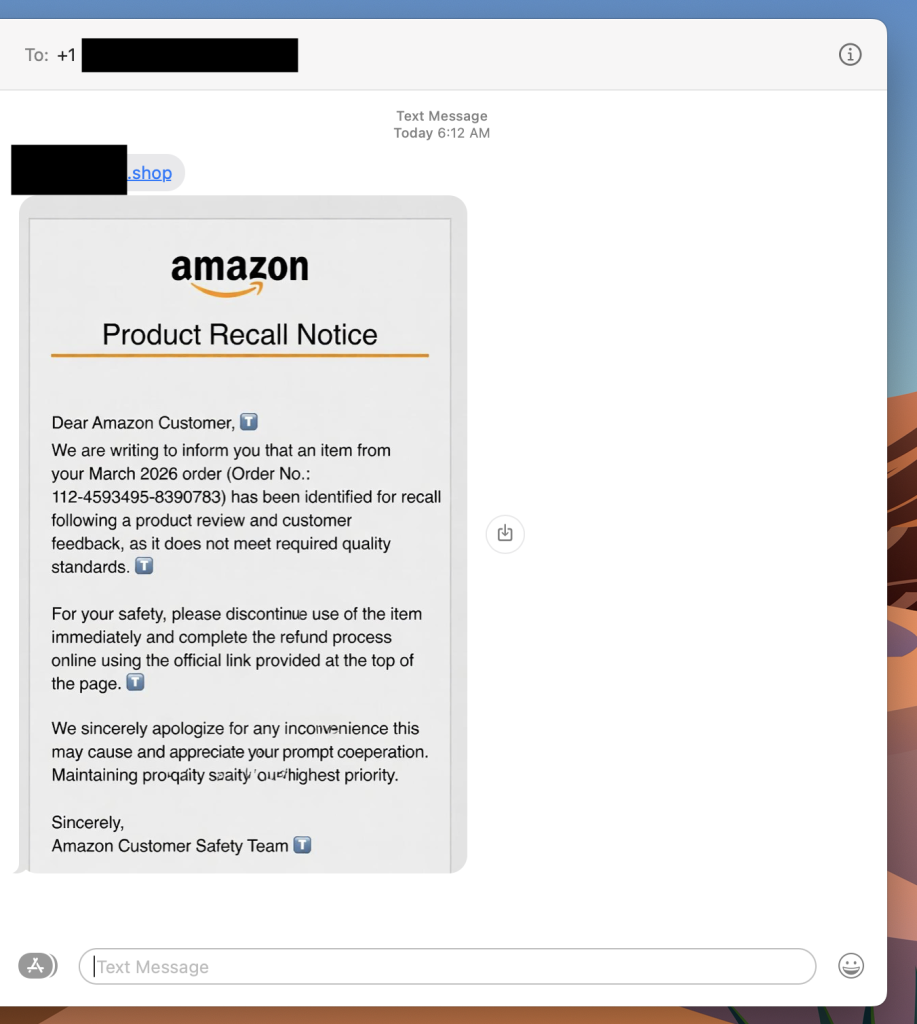
This is a fake Amazon recall scam, and it is making the rounds right now. The goal is to get you to click that link, which takes you to a site designed to harvest your login credentials, payment information, or both.
If you get a text like this, do not click the link. Go directly to amazon.com in your browser, log in, and check your orders and messages from there. Amazon does not initiate recall or refund processes through unsolicited texts with outside links.
What Is a Fake Amazon Recall Scam And How Does It Work?
A fake Amazon recall scam is a text message or email in which criminals impersonate Amazon to convince you that one of your recent orders has been flagged for a product recall. The message directs you to an external link leading to a phishing site designed to steal your Amazon credentials, credit card details, or personal information.
Red Flags To Watch For
- The text comes from an unknown number, not a short code or verified sender
- The link goes to a domain that is not amazon.com
- The message asks you to complete a refund through an external link
- Small typos or awkward phrasing appear in what looks like official communication
- The greeting says “Dear Amazon Customer” rather than your actual name
What To Do If You Get One
- Do not click the link
- Go to amazon.com directly and check your orders and account notifications
- Report the text to Amazon at stop-spoofing@amazon.com
- Block the number
Where McAfee Steps In (So You Don’t Have to Guess)
Scams today are layered. A fake email leads to stolen credentials. A breach leads to targeted phishing. And those follow-ups are getting harder to spot.
With McAfee+ Advanced, multiple layers work together so you’re not left figuring it out after the damage is done:
- Identity Monitoring alerts you if your personal info shows up where it should not, so you can act fast
- Personal Data Cleanup helps remove your information from sites selling it.
- Scam Detector flags suspicious texts, emails, links, QR codes, and even deepfake videos before you engage
- Safe Browsing helps block risky sites, even if you do accidentally click
- Device Security helps detect malicious apps or downloads
- Secure VPN keeps your data private, especially on public Wi-Fi
McAfee Safety Tips This Week
Our advice based on this week’s scams and stories:
- If your child’s school uses Canvas, update their password now and enable multi-factor authentication if available
- Consider a credit freeze for your child’s identity, especially if sensitive identifiers were part of the breach
- Never click links in unsolicited texts about refunds, recalls, or account issues — go directly to the official site instead
- Treat any message that references your recent orders or personal account details with extra skepticism, even if it looks legitimate
- Use Scam Detector to check suspicious links before engaging, and stay alert in the weeks and months after a breach, not just the first few days
And we’ll be back next week with more scams and cybersecurity news making headlines.
Stay Updated
Follow us to stay updated on all things McAfee and on top of the latest consumer and mobile security threats.