

This week in scams, attackers are leaning hard on familiar brands, everyday tools, and routine behavior to trigger fast, unthinking reactions. From fake Netflix billing alerts to malicious browser extensions and QR code phishing tied to foreign espionage, the common thread is trust being weaponized at exactly the right moment.
Every week, this roundup breaks down the scam and cybersecurity stories making news and explains how they actually work, so readers can better recognize risk and avoid being manipulated.
Let’s get into it.
Netflix Billing Emails Are Back… And Still Catching People Off Guard
The big picture: Subscription phishing is resurging, with scammers impersonating Netflix and using fake billing failures to push victims into handing over payment details.
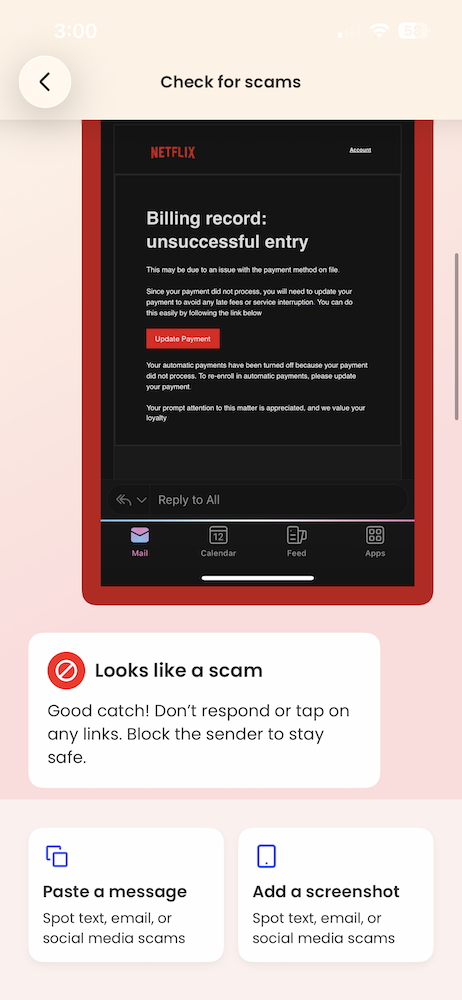
What happened: Multiple Netflix impersonation emails circulated again this month, warning recipients that a payment failed and urging them to “update payment” to avoid service interruption. The messages closely mirror Netflix’s real branding and include polished formatting, official-looking language, and even PDF attachments designed to feel like legitimate billing notices.
What makes these scams effective is timing. Victims often receive them while actively reviewing subscriptions, updating payment methods, or considering canceling services. That context lowers skepticism just enough for a quick click before slowing down to verify.
McAfee’s Scam Detector flagged the messages (which one of our own employees received this week) as phishing, confirming they were designed to steal payment information rather than resolve a real billing issue.
Red flags to watch for:
- Unexpected billing problems paired with urgent calls to act
- Payment requests delivered by email instead of inside the app
- Attachments or buttons asking you to “fix” account issues
- Sender addresses that don’t match official Netflix domains
How this scam works: This is classic brand impersonation phishing. Scammers don’t need to hack Netflix itself. They rely on people recognizing the logo, trusting the message, and reacting emotionally to the idea of losing access. The attachment and clean design help bypass instinctive spam filters in the brain, even when technical filters catch it later.
Netflix has warned customers about these scams and offers advice on its site if you encounter one.
What to do instead: If you get a billing alert, don’t click. Open the Netflix app or manually type the site address to check your account. If there’s no issue there, the email wasn’t real.
Fake Ad Blocker Crashes Browsers to Push “Fix It” Malware
The big picture: Attackers are exploiting browser crashes themselves as a social engineering tool, turning technical disruption into a pathway for malware installation.
What happened: Researchers reported a malvertising campaign promoting a fake ad-blocking browser extension called “NexShield,” which falsely claimed to be created by the developer of a well-known, legitimate ad blocker. Once installed, the extension intentionally overwhelmed the browser, causing freezes, crashes, and system instability.
After restart, victims were shown fake security warnings instructing them to “fix” the problem by running commands on their own computer. Following those instructions triggered the download of a remote access tool capable of spying, executing commands, and installing additional malware. The reporting was first detailed by Bleeping Computer, with technical analysis from security researchers.
Red flags to watch for:
- Browser extensions promising performance boosts or “ultimate” protection
- Crashes immediately after installing a new extension
- Pop-ups instructing you to run commands manually
- “Security fixes” that require copying and pasting code
How this scam works: This is a variant of ClickFix attacks. Instead of faking a problem, attackers cause a real one, then position themselves as the solution. The crash creates urgency and confusion, making people more likely to follow instructions they’d normally question. It turns frustration into compliance.
FBI Warns QR Code Phishing Is Being Used for Cyber Espionage
The big picture: QR codes are being used as stealth phishing tools, with highly targeted attacks tied to foreign intelligence operations.
What happened: The Federal Bureau of Investigation issued a warning about QR code phishing, or “quishing,” campaigns linked to a North Korean government-backed hacking group. According to reporting by Fox News, attackers sent emails containing QR codes that redirected victims to fake login pages or malware-hosting sites.
In some cases, simply visiting the site allowed attackers to collect device data, location details, and system information, even if no credentials were entered. These campaigns are highly targeted, often aimed at professionals in policy, research, and technology sectors.
Red flags to watch for:
- QR codes sent by email or messaging apps
- QR codes leading to login pages for work tools or cloud services
- Messages that feel personalized but unexpected
- Requests to scan instead of click
How this scam works: QR codes hide the destination URL, removing the visual cues people rely on to judge safety. Because scanning feels faster and more “passive” than clicking a link, people often skip verification entirely. That moment of trust is what attackers exploit.
Read our ultimate guide to “quishing” and how to spot and avoid QR code scams here.
McAfee’s Safety Tips for This Week
- Verify inside official apps. Billing or security issues should be confirmed directly in the app or website you normally use, not through email links or QR codes.
- Treat extensions like software installs. Only install browser extensions from trusted publishers you already know, and remove anything that causes instability.
- Slow down with QR codes. If a QR code leads to a login page or download, close it and navigate manually instead.
- Watch for urgency + familiarity. Scammers increasingly rely on brands, tools, and behaviors you already trust to short-circuit caution.
McAfee will be back next week with another roundup of the scams making headlines and the practical steps you can take to stay safer online.

Stay Updated
Follow us to stay updated on all things McAfee and on top of the latest consumer and mobile security threats.