

Free airport Wi-Fi can be useful when you’re waiting for a flight. But this week’s biggest security story is a reminder that there are two different ways your information can be exposed when you connect.
One risk happens while your information is traveling across a public network. Another happens after a company collects and stores information about you.
A cyberattack affecting three major UK airports illustrates the difference, and why travelers need protection for both.

What happened in the Manchester Airports Group cyberattack?
Manchester Airports Group, or MAG, confirmed that an unauthorized third party obtained customer information connected with Manchester Airport, London Stansted Airport, and East Midlands Airport.
According to reports, the affected information came from car park, airport lounge, Fast Track bookings, and airport Wi-Fi registrations. MAG says the stolen data includes email addresses, phone numbers, vehicle registration numbers, and postcodes. The company says the affected system did not contain customers’ payment or banking details.
The Telegraph reported that approximately 8.7 million passengers were affected and that more than 90% of the stolen records were email addresses, largely because travelers provide an email address when registering for free airport Wi-Fi. The attackers reportedly demanded a ransom, which MAG declined to pay.
MAG says airport operations and passenger safety were not affected and that it has contained access to the compromised systems.
For travelers, however, the breach creates another concern: what criminals might do with the stolen information next.
Why stolen airport data can lead to convincing scams
An email address alone might not seem particularly sensitive. But combined with a phone number, postcode, vehicle registration, or knowledge that someone has interacted with a particular airport, it becomes more useful to a scammer.
That information can help criminals make phishing emails and texts feel believable.
A message might claim there is a problem with your airport parking reservation, ask you to confirm a Fast Track booking, or say you need to pay an outstanding airport charge. Someone who recently used the airport may be much more inclined to click.
That is one reason breach victims should be especially cautious about unexpected messages that appear connected to the organization involved.
Does a VPN protect you from an airport Wi-Fi data breach?
Not from this kind of breach.
A VPN, or virtual private network, encrypts the internet traffic traveling between your device and the VPN service. Think of it as putting your online activity inside a protected tunnel while it crosses a public network.
That matters at airports, hotels, cafés, and other places where many people share the same Wi-Fi. McAfee Secure VPN can encrypt your connection and can be configured to turn on automatically when you join an unsecured network.
But that is different from what happened here.
If you voluntarily give an airport your email address to register for Wi-Fi, that email address may then be stored in the airport operator’s systems. A VPN cannot prevent a later breach of that company’s database.
In short: A VPN helps protect information in transit. It does not control what happens to information you give directly to a company.
Both risks matter.
Before, During, and After a Data Breach
Before a breach: Share only the information a service genuinely requires. Use strong, unique passwords for online accounts, and use a VPN when connecting to public Wi-Fi.
During a breach: Look for information directly from the affected company rather than relying on messages arriving by email or text. Criminals often take advantage of security incidents by sending fake “account protection” or “verify your information” messages.
After a breach: Watch for unusual emails, calls, texts, and account activity. Be particularly suspicious when someone creates urgency or asks for passwords, verification codes, payment information, or money.
MAG specifically warns that it will not unexpectedly contact customers asking for payment card information, banking details, or passwords.
At a Glance
➡️ The breach affected customer information from bookings and airport Wi-Fi registrations.
➡️ 8.7 million passengers were affected
➡️ MAG says banking and payment details were not stored in the affected system.
➡️ Stolen contact information can still make phishing and impersonation scams more convincing.
➡️ A VPN protects your connection on public Wi-Fi, but it cannot prevent a company from later suffering a database breach.
➡️ Be particularly cautious about unexpected airport-related emails and texts following the incident.
How McAfee Helps
Secure VPN helps address the other major risk associated with airport Wi-Fi: someone attempting to monitor your traffic while you use an unsecured network. McAfee Secure VPN encrypts your connection and can automatically activate on unsecured Wi-Fi, helping keep browsing activity and information transmitted from your device private.
Identity Monitoring keeps watch for your personal information associated with breaches, giving you an opportunity to act when exposed information is detected.
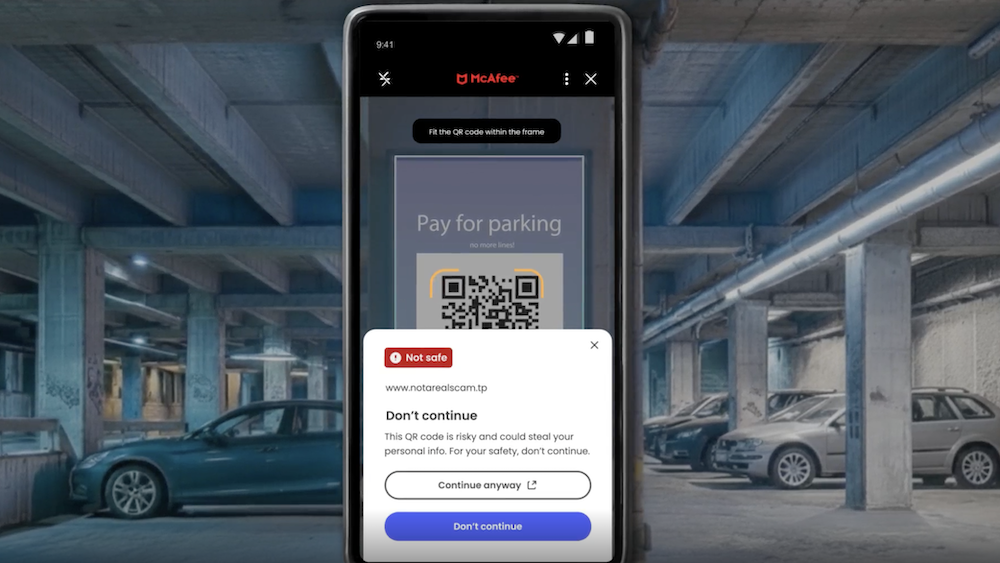
And because stolen email addresses and phone numbers can fuel follow-up phishing attempts, Scam Detector can identify suspicious texts, emails, and other QR codes before you act on them.
The broader lesson is layered protection: protect your connection while you’re online, then keep watching for misuse of information that companies already hold.
Other Scam and Security News This Week
Hackers claim breach of major data center provider. The ShinyHunters group claims it stole extensive corporate and employee information from U.S. data center company CyrusOne and demanded $13 million.
CyrusOne had not publicly confirmed the hackers’ claims when TechRadar reported the story, so the alleged scale of the breach remains unverified.
Source: TechRadar
Man accused of posing as a 49ers player in $1.3 million romance scam. Federal prosecutors allege that two men defrauded at least 26 women after one portrayed himself online as a wealthy San Francisco 49ers player and the other posed as his financial adviser.
Investigators say fake banking apps and fabricated investment balances helped make the scheme appear legitimate; both defendants are presumed innocent unless proven guilty.
Source: U.S. Department of Justice
Fake sports streams target fans looking for the game. The Better Business Bureau warns that scammers post supposed free streaming links on social media, sometimes tagging real schools or teams, then direct fans to sites designed to collect payment or personal information instead of showing a game.
Go to the team, school, league, or known streaming provider directly rather than trusting a link in a social post — and remember that HTTPS alone does not prove a website is legitimate.
Source: Better Business Bureau
This Week’s Safety Tips
“Once you give your information to a company, you can’t completely control what happens to it,” says McAfee’s Tyler McGee. “But you can limit what you share and take steps to protect yourself if your information is exposed.”
“Only provide what’s needed, use unique passwords and turn on multi-factor authentication where you can. Tools like McAfee’s identity monitoring can also alert you if your information shows up in a known breach. And be extra cautious after a breach,” he says. “Scammers can use exposed information to make messages about a booking, refund or account look much more convincing. If you get one, go directly to the company’s website or app rather than clicking the link.”
✓ Use a VPN on public Wi-Fi. Encrypt your connection before checking email, shopping, banking, or signing into important accounts.
✓ Treat breach-related messages cautiously. Navigate to the company’s official website yourself rather than clicking a link in an unexpected email or text.
✓ Use unique passwords. A password stolen from one service should never unlock another account.
✓ Verify before sending money. Whether someone claims to be an athlete, investment adviser, streaming provider, or familiar company, independently confirm who you are dealing with.
And we’ll be back next week with more cybersecurity news and scam alerts.
Stay Updated
Follow us to stay updated on all things McAfee and on top of the latest consumer and mobile security threats.