

A new scam making the rounds takes a familiar delivery trick and upgrades it with hyper‑realistic messaging and a QR code that looks safe to scan.
But don’t be fooled.
It’s the same delivery scam playbook scammers have relied on for years, just repackaged with better design and more convincing details.
You get a message with a notice that looks something like this, a real message received by our team and tested against McAfee’s Scam Detector.
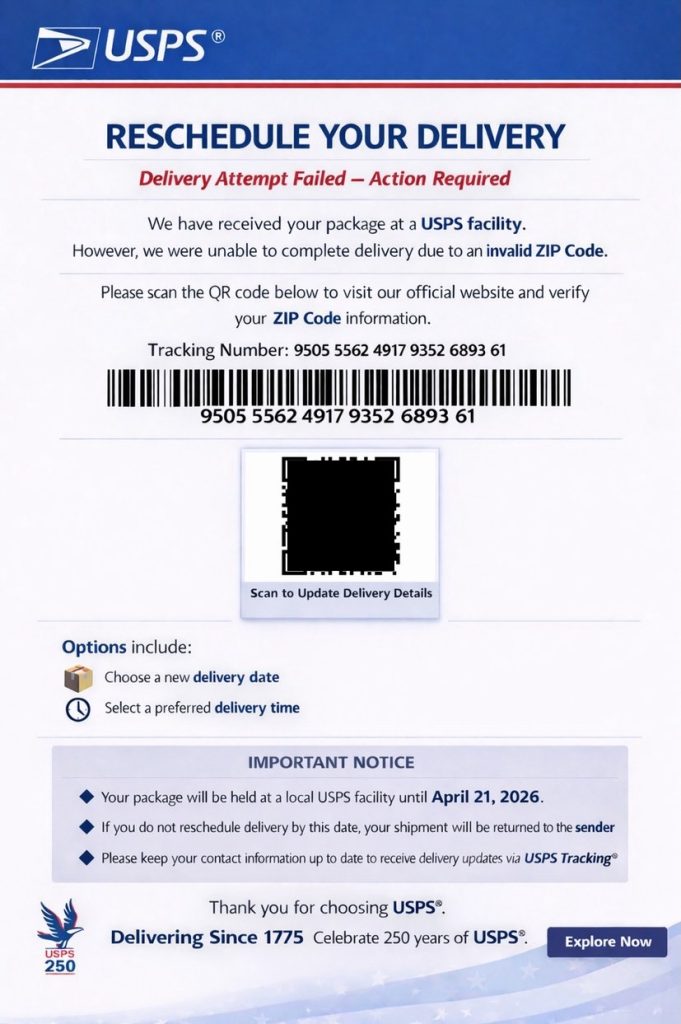
That added layer of realism is what makes this version more dangerous. But it doesn’t hold up under scrutiny. McAfee’s Scam Detector flagged both the suspicious language and the QR code in this message before any interaction.
If you receive something like this, pause. Do not scan the code.
You can also protect yourself with McAfee’s Scam Detector, which flags suspicious links and messages, including delivery scams and QR‑based attacks, and explains why they may be risky.

What is the USPS QR Code Scam and How Does it Work?
The USPS QR code scam is a phishing attempt where scammers impersonate postal services and use QR codes instead of clickable links to direct victims to malicious websites.
Once scanned, the QR code can lead to a fake USPS page that asks for payment, login credentials, or personal information.
How the scam works
| Step | What happens | The red flags | What to do | How McAfee helps |
| 1 | You receive a text about a delivery issue or missed package | Urgency, you’re not tracking a package | Be skeptical of unsolicited delivery messages | Scam Detector flags suspicious messages |
| 2 | The message includes a QR code instead of a link | QR codes instead of official tracking links is a red flag | Do not scan QR codes from unknown sources | QR scanning protection warns before opening risky destinations |
| 3 | You scan the code and land on a fake USPS page | Generic or slightly off branding on the webpage | Do not enter any information | Safe Browsing blocks known malicious sites |
| 4 | The page asks for payment or personal details | Requests for small “redelivery” or “processing” fees are not normal | Exit immediately and do not submit anything | Scam Detector explains why the page is risky, and Identity Monitoring supports you when if your info gets out. |
What To Do If You Get This Message
- Do not scan the QR code
- Go directly to the official USPS website to check tracking
- Delete the message
- Report it as spam
- Monitor your accounts if you interacted with it
And that, my friends, is scam number one in this week’s This Week in Scams.
Let’s get into what else is on our radar.
A Major Health Data Breach Exposes 500,000 Records
A massive health data incident is raising new concerns about how sensitive information is handled and shared.
According to reporting from the Associated Press, data tied to 500,000 participants in a major U.K. health research project was found listed for sale online. The dataset included biological and health-related information, though it did not contain direct identifiers like names or contact details.
Access to the data had been granted to research institutions, but that access has since been revoked. Authorities say no purchases were made, and the listing has been removed.
Still, the situation highlights a growing reality: once data is accessed or shared, control over it becomes harder to guarantee.
What This Breach Says About Data Privacy
Scams are no longer isolated events. They are layered.
A data breach does not just stay a breach. It becomes fuel for future scams. Exposed information can be used to make phishing messages more convincing, personalize attacks, and build trust with targets.
That is why detection alone is not enough anymore. Protection has to account for both incoming threats and what happens when data is already out there.
How McAfee Protects You In A World of Scams and Data Breaches
McAfee+ Advanced gives you multiple layers working together so you are not left figuring it out after the damage is done:
- Identity Monitoring alerts you if your personal info shows up where it should not, so you can act fast
- Personal Data Cleanup helps remove your information from data broker sites, making you harder to target in the first place
- Scam Detector flags suspicious texts, emails, links, and even deepfake videos before you engage
- Safe Browsing helps block risky sites if you do click
- Device Security helps detect malicious apps or downloads
- Secure VPN keeps your data private, especially on public Wi-Fi
McAfee Safety Tips This Week
As always, we have some best practices and safety tips for navigating life online:
- Pause before clicking, especially when a message creates urgency
- Go directly to websites or apps instead of using email links
- Be skeptical of routine account alerts that push immediate action
- Double-check sender addresses and URLs closely
- Use tools like McAfee’s Scam Detector to flag suspicious links and messages before interacting
- Turn on identity monitoring so you’re alerted if your data is exposed
And we’ll be back next week with more scams making headlines.
Stay Updated
Follow us to stay updated on all things McAfee and on top of the latest consumer and mobile security threats.