

It looks harmless enough.
A digital party invitation lands in your inbox or phone. You click to see the details. Then it asks you to log in or create an account before revealing the event.
That’s where the scam begins.

Fake e-vite phishing scams are on the rise, and they take advantage of something simple: social trust. You’re far more likely to click an invitation from someone you recognize than a generic “account alert” or “delivery notice.”
“That’s how they earn your trust,” says McAfee’s Head of Threat Research Abhishek Karnik. “You’re curious to know what they have to say, in this case, Evite.”
And that’s exactly why scammers are using them.
In fact, here’s a screenshot of a fake phishing email I received last fall, when we first wrote up and reported on this scam:
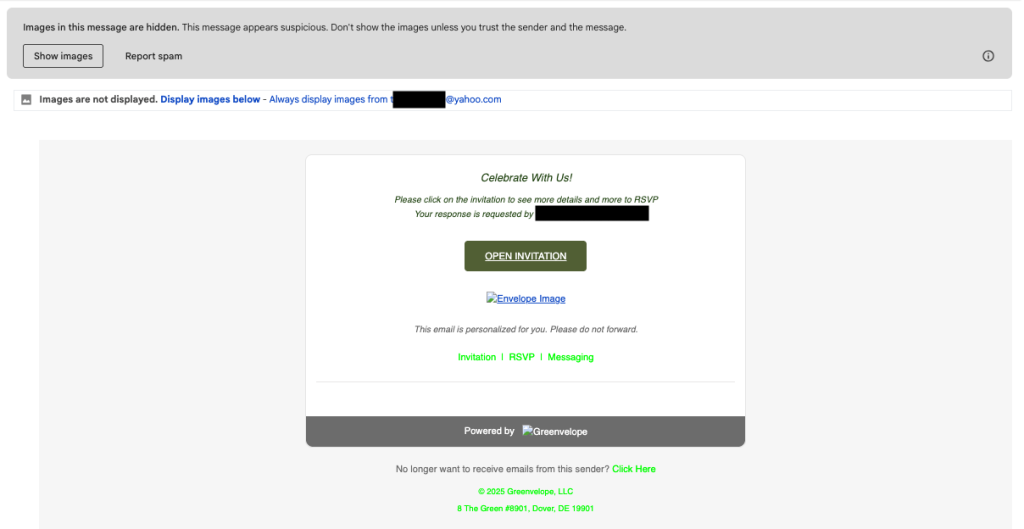
When you click the “open invitation” link, it immediately asks you to sign in or create an account with your personal information. That’s the step where scammers steal your private data.
“Once they get access to your account, now they can spam your contacts,” Karnik says. “So it starts off as a very rudimentary way of collecting information. But then that can be utilized by other scammers. They might even sell your information online for instance,”
What Is a Fake E-Vite Scam?
A fake e-vite scam is a phishing attack that pretends to be a real invitation from platforms such as Paperless Post or other digital invitation services.
The goal is to trick you into:
- Entering your email and password
- Creating a fake account on a malicious site
- Clicking links that lead to credential-stealing pages
- Downloading malware disguised as an invitation
Once scammers have your login information, they can:
- Take over your email
- Reset passwords on other accounts
- Send scams to your contacts
- Launch identity theft attempts
How These Fake Invitation Scams Usually Work
Here’s the most common flow:
- You receive a digital invitation that looks normal
- The message prompts you to “view the invitation”
- You’re redirected to a login or signup page
- You enter your email, password, or personal info
- The invitation never appears
- Your credentials have now been stolen
Because this starts with something familiar and social, many people don’t realize it’s phishing until accounts are already compromised. Plus, scammers then use your email and name to trick friends and family into trusting more fake e-vites from your account.
“This is why it’s important to slow down, verify, and always pause before entering your login credentials on a page you didn’t navigate to on your own,” Karnik advises. “Even if it appears to be from someone you know, remember that scammers can hack or impersonate emails, social profiles, and phone numbers to earn your trust. Try to verify the origin of the message by reaching out to the contact on a different platform first.”
How to Tell If an Email Invite (Evite) Is Real
Invitation platforms, such as Paperless Post, have publicly acknowledged these scams and shared what legitimate messages actually look like.
Legitimate Evite Emails Will Never:
- Include .EXE attachments
- Include .PDF attachments
- Include any attachments other than image files
Official Paperless Post Email Domains:
Legitimate invitations and account messages only come from:
- paperless@email.paperlesspost.com
- paperlesspost@paperlesspost.com
- paperlesspost@accounts.paperlesspost.com
Official support emails only come from:
- help@paperlesspost.com
- pds@paperlesspost.com
- security@paperlesspost.com
- privacy@paperlesspost.com
- agent@paperlesspost.com
- optout@paperlesspost.com
If the sender does not match one of these exactly, it’s a scam.
Paperless Post also notes that verified emails may display a blue checkmark in supported inboxes to confirm authenticity.
This is not the only company impersonated by these scams, so be wary of unexpected emails from other popular evite platforms as well and apply similar precautions.
The Biggest Red Flags of a Fake E-Vite
If you see any of the following, do not click:
- You’re forced to log in to “see” who invited you
- The sender email doesn’t match the official domains above
- The invitation creates urgency
- You’re asked for payment to view the event
- The message feels generic instead of personal
- The site address looks slightly off
Why These Scams Are So Effective Right Now
These scams rely on trust, recognition, and realistic, polished, AI-powered visuals.
Many now use:
- Polished branding
- Clean layouts
- Familiar platforms
- Friendly language
- Social pressure
Invitation phishing is especially powerful because:
- It triggers curiosity
- It feels harmless
- It mimics real social behavior
- It doesn’t start with fear or threats
- By the time the scam turns risky, your guard is already down.
What To Do If You Clicked a Fake E-Vite
If you entered any information into a suspicious invitation page:
- Immediately change your email password
- Change any other account that reused that password
- Enable two-factor authentication
- Check for unknown login activity
- Warn contacts if your email may have been compromised
- Run a security scan on your device
The faster you act, the more damage you can prevent.
How McAfee+ Advanced Protects Against Evite Scams
With McAfee+ Advanced, multiple layers work together before any damage is done:
- Scam Detector flags suspicious texts, emails, links, QR codes, and even deepfake videos before you engage
- Secure VPN keeps your data private, especially on public Wi-Fi
- Web Protection helps block risky sites, even if you do accidentally click helps block risky sites, even if you do accidentally click
- Password Manager doesn’t just help you make unique, strong passwords, it keeps them stored and organized for you
- Device Security helps detect malicious apps or downloads
- Identity Monitoring alerts you if your personal info shows up where it should not, so you can act fast
- Personal Data Cleanup helps remove your information from sites selling it.
- Online Account Cleanup assists in taking down your old, forgotten accounts across the web
- Social Privacy Manager helps you monitor and change privacy settings across your social platforms in just a few clicks
Together, these protections are designed to address the broader range of online risks people face every day.
Stay Updated
Follow us to stay updated on all things McAfee and on top of the latest consumer and mobile security threats.