

Memorial Day weekend officially kicks off summer, and for millions of Americans, that means road trips, flights, cookouts, and a little online shopping for the deals.
Unfortunately, scammers know this. They count on the fact that you’re distracted, you’re moving fast, and you’re probably connected to a network you don’t own.
Here are five scams surging this holiday weekend, what they look like, and how to stay ahead of them.

1. Fake Travel Alerts from “Your Bank” or Hotel
You’re packing your bag when a text arrives: “Unusual activity detected on your account. Verify now to avoid suspension.”
It looks like it’s from your bank, or maybe your hotel loyalty program. There’s a link. There’s urgency. And that’s exactly the point.
These are brand impersonation scams, and they’re a dominant tactic year-round, but they spike around travel holidays when people are actively monitoring reservations and accounts.
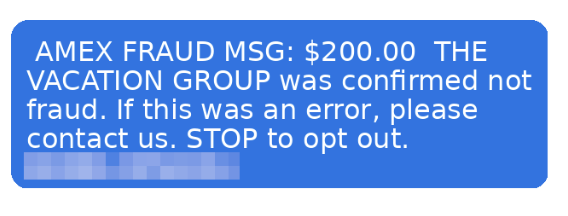
According to McAfee research, trusted brands like banks, airlines, and hotels are among the most commonly impersonated, and email scams impersonating retail and financial brands have surged up to 85% as major holidays approach.
The message will typically ask you to click a link and “confirm your details” to secure your account or honor a reservation. That link leads to a convincing-looking fake site designed to capture your login credentials, payment info, or both.
How to Avoid Travel Alert Scams:
- Don’t click links in unsolicited texts or emails.
- Go directly to the company’s app or website by typing the URL yourself.
- Remember: pressure is a tactic, not customer service.
McAfee’s Scam Detector can flag suspicious messages before you interact with them, whether they come via text, email, or social media.
2. Fake Memorial Day Weekend “Deals”
Memorial Day is one of the biggest shopping weekends of the year. Scammers treat it like an open invitation.
Fraudulent retailers flood social feeds with too-good-to-be-true deals on everything from patio furniture to electronics, often impersonating legitimate brands with copycat websites and paid ads.
According to McAfee’s holiday shopping research, 91% of shoppers see ads from unfamiliar retailers, 37% say they might buy from a brand they don’t recognize, and a full 40% of consumers have abandoned a purchase out of fear that the deal wasn’t real.
The most impersonated brands in McAfee’s research span luxury labels (Coach, Dior, Gucci) to mainstream favorites (Apple, Samsung, Nintendo, Disney), exactly the kind of items that show up in “blowout sale” ads. Fake storefronts have grown significantly, with technology URL scams rising nearly 50%.
Once shoppers enter their payment details on a fraudulent site, that information goes directly to criminals. The average scam loss during the holiday shopping period runs around $840 per victim.
How to Avoid Shopping Scams:
- Type retailer URLs directly into your browser instead of clicking through ads or social posts.
- Look for HTTPS and double-check the domain carefully before entering any payment info.
- If a deal looks unbelievably good, verify it on the retailer’s official app before buying.
McAfee’s Web Protection blocks malicious and suspicious sites before they load, including fake checkout pages.
3. QR Code Scams at Gas Stations and Travel Stops
If you’re road-tripping this weekend, you may scan a QR code somewhere. It could be at the gas pump, a rest stop, a parking meter, or a roadside attraction. Scammers know this too.
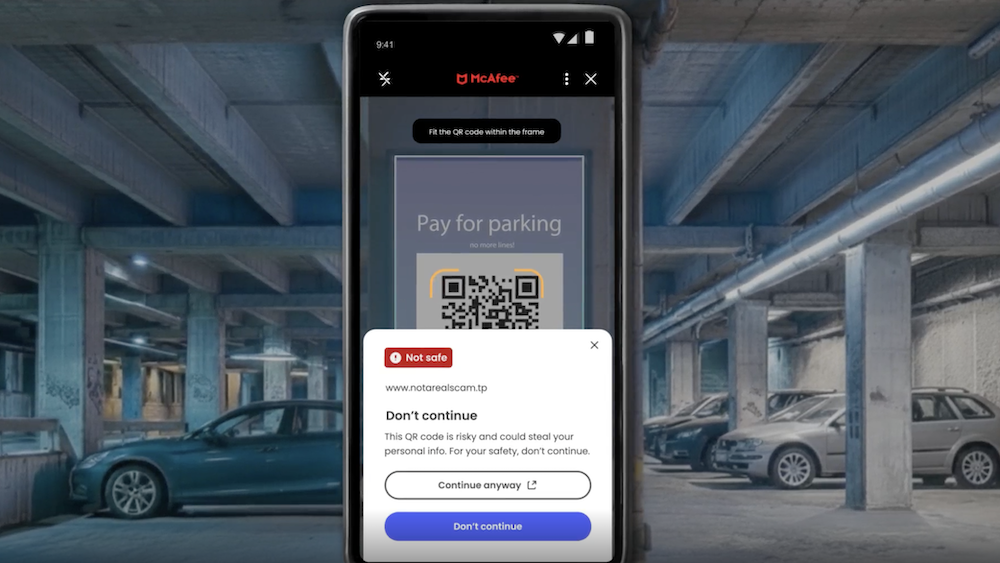
Criminals increasingly place fake QR codes over legitimate ones on gas station pumps, parking kiosks, and public signs. When you scan, you’re redirected to a convincing-looking payment or login page that captures your financial information. This is known as “quishing” or phishing via QR code.
McAfee research shows just how widespread this risk has become: 68% of people scanned a QR code in the past three months, and 18% ended up on a suspicious or unsafe page after scanning. Among those who did, more than half took a risky action like entering personal information, installing an app, or connecting a digital wallet.
How to Avoid Sketchy QR Codes:
- Before scanning any QR code in public, look closely at the sticker or sign.
- If it looks like it’s been placed over something else, skip it.
- If you do scan, check the URL before proceeding.
McAfee’s Scam Detector now includes instant QR code safety checks that assess risk before you tap, so you’re not flying blind at the gas pump.
4. Public Wi-Fi Traps at Airports, Hotels, and Coffee Shops
Whether you’re waiting at the airport or grabbing coffee before hitting the highway, free Wi-Fi can feel like a gift. But not every “free Wi-Fi” network is what it appears to be.
Hackers set up what are called “evil twin” networks, hotspots with names designed to look exactly like the legitimate network at the airport, hotel, or café you’re in.
The moment you connect, they can use tools called packet sniffers to capture the data you send and receive: passwords, banking credentials, credit card numbers, email logins.
According to McAfee’s travel research, 63% of travelers connect to public Wi-Fi, and 49% use airport Wi-Fi, making these among the riskiest behaviors travelers engage in without realizing it.
Some of these fake networks go further, presenting a phony login screen that captures your username and password for popular services like Google or Apple before you even realize you’ve been compromised.
How to Avoid Malicious Wi-Fi :
- Always confirm the exact Wi-Fi network name with staff before connecting.
- Turn off auto-join for Wi-Fi on your devices.
- And most importantly: use a VPN.
A VPN creates an encrypted tunnel for your internet traffic, so even if a hacker intercepts it, they’ll only see scrambled data. McAfee’s VPN is included in McAfee+ plans and automatically connects when you join public Wi-Fi, exactly the protection you want when you’re traveling and connecting everywhere.
5. Toll Road and Parking Text Scams (Expect a Surge After the Weekend)
You may have seen these already: a text that says you owe an unpaid toll or parking fee, with a link to pay before penalties kick in. These scams have been circulating for a while, and there’s a good chance Memorial Day weekend is about to make them worse.
Scammers track news cycles and know that millions of Americans will be driving this weekend, many of them through toll roads and unfamiliar areas.
That means they can blast out fake “unpaid toll” texts after the holiday and a significant percentage of recipients will think: “Actually, I did drive somewhere new this weekend.” That uncertainty is exactly what they’re counting on.
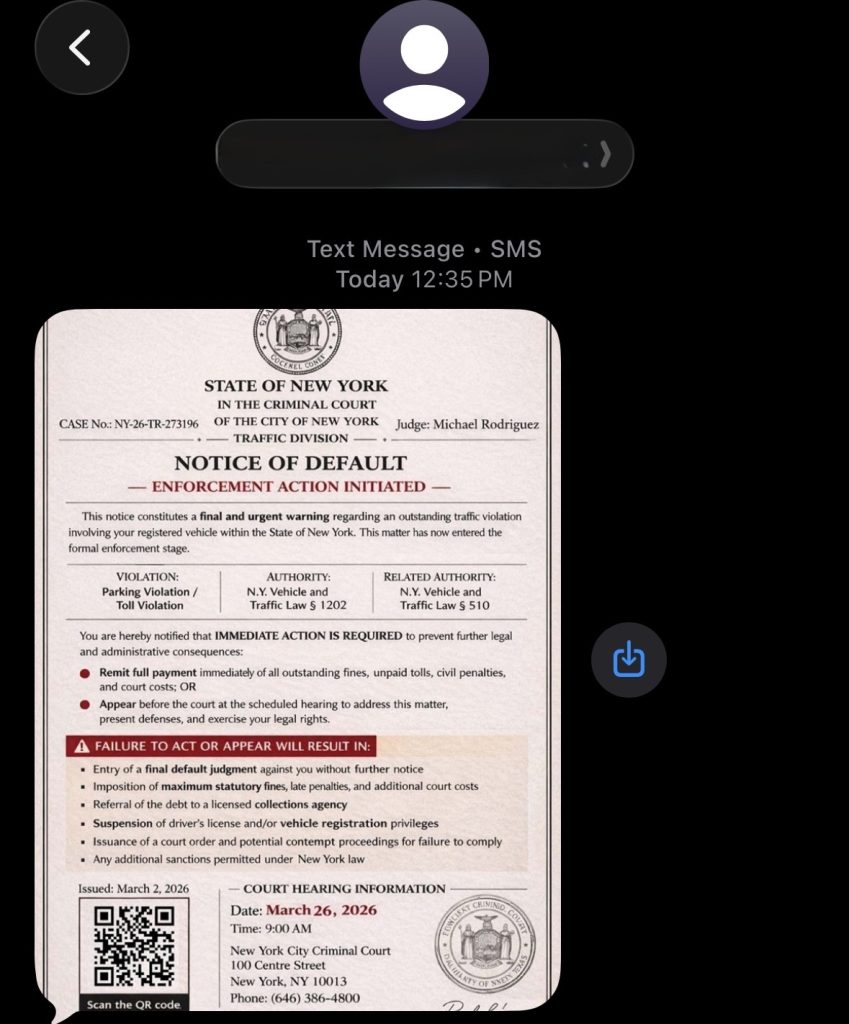
These texts typically impersonate EZPass, SunPass, or state transportation departments and create urgency around a small fee to avoid larger fines. The link leads to a fake payment page designed to steal your credit card details.
How to Avoid Toll Scams:
- Don’t click links in unsolicited toll or parking texts.
- If you think the charge might be legitimate, go directly to your state’s official toll authority website and look up your account there.
- Real toll agencies will not threaten immediate penalties over text with a payment link.
- If you receive one of these texts after this weekend, treat it as suspicious by default.
Have a Safe Memorial Day Weekend
Scammers don’t take holidays. If anything, long weekends are peak season. The good news: a little awareness goes a long way. Slow down before you click, verify before you scan, and protect your connection before you log on.
McAfee+ Advanced comes with layered protection across all the moments where scams are most likely to strike, from the gas station to the hotel lobby to your inbox.
Stay safe out there.
Stay Updated
Follow us to stay updated on all things McAfee and on top of the latest consumer and mobile security threats.