

For this week in scams, we have fake AI-generated shopping images that could spoil your holidays, scammers use an Apple Support ticket in a takeover attempt, and a PlayStation scam partly powered by AI.
Let’s start with those fake ads, because holiday shopping is in full swing.
Keep a sharp eye out for fake AI shopping ads that sell knockoff goods
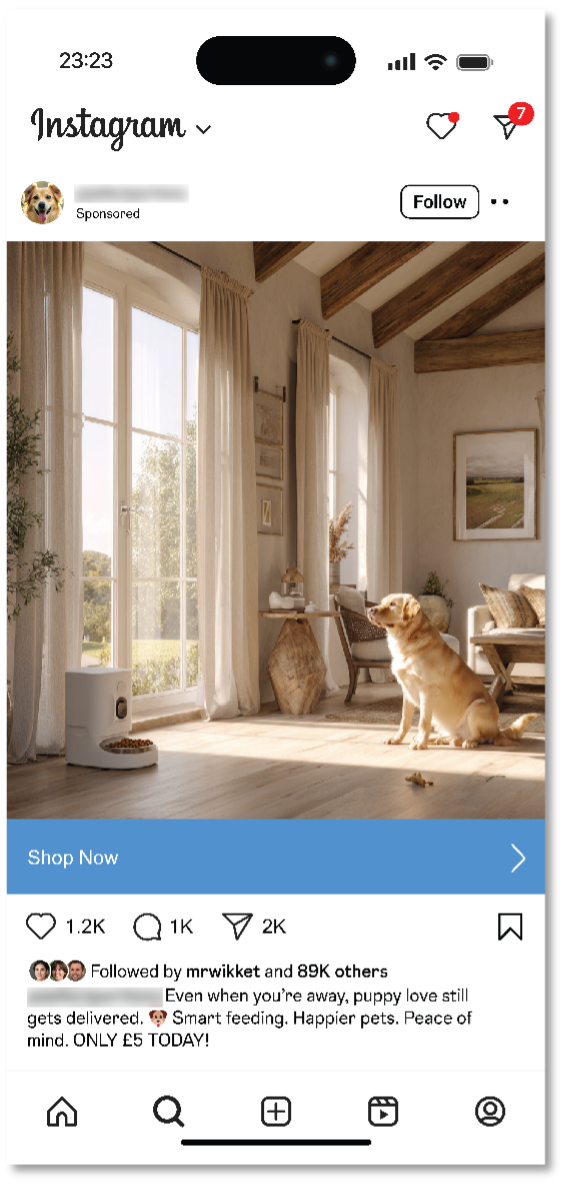
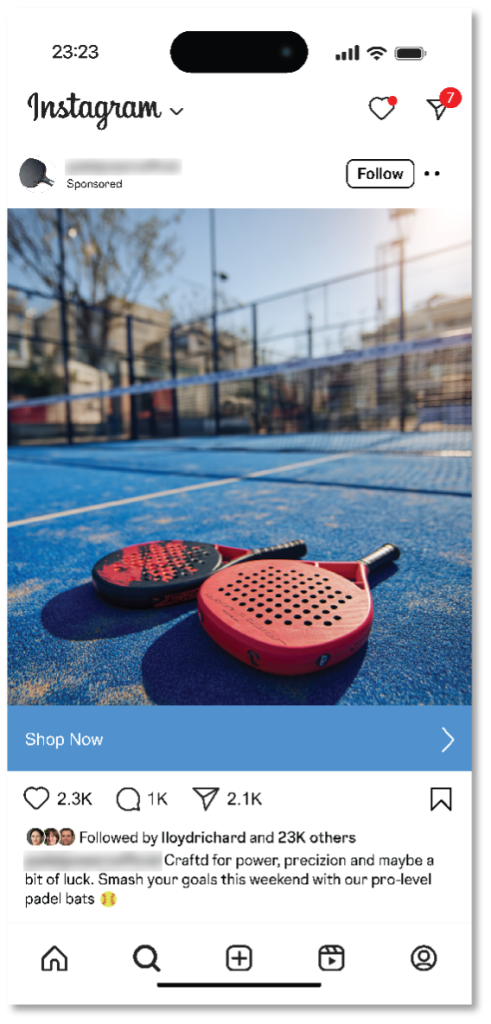
Turns out that three-quarters of people (74%) can’t correctly identify a fake AI-generated social media ad featuring popular holiday gifts—which could leave them open to online shopping scams.
That finding, and several others, comes by way of research from Santander, a financial services company in the UK.
Here’s a quick rundown of what else they found:
- Less than one in 10 (8%) people feel “very confident” in their ability to spot an AI-generated ad on social media.
- More than half (56%) fear that they or a family member could get scammed as a result.
- About two-thirds (63%) said that they won’t purchase anything from social media platforms because they’re not sure what’s real and what’s fake.
From the study … could you tell these ads are both fake?
In all, cheap and readily available AI tools make spinning up fake ads quick and easy work. The same goes for launching websites where those “goods” can get sold. In the past, we’ve seen scammers take two different approaches when they use social media ads and websites to lure in their victims:
Phishing sites
During the holidays, scammers pump out ads that offer seemingly outstanding deals on hot items. Of course, the offer and the site where it’s “sold” is fake. Victims hand over their personal info and credit card number, never to see the items they thought they’d purchased. On top of the money a victim loses, the scammer also has their card info and can run up its tab or sell it to others on the dark web.
Knock-off sites
In this case, the scammer indeed sells and delivers something. But you don’t get what you paid for. The item looks, feels, fits, or works entirely differently than what was advertised. In this way, people wind up with a cheaply made item cobbled together with inferior materials. Worse yet, these scams potentially prop up sweatshops, child labor, and other illegal operations in the process. Nothing about these sites and the things they sell on them are genuine.
So, fake AI shopping ads are out there. What should you look out for? Here’s a quick list:
- First off, any offer that sounds too good to be true and heavy discounts on hard-to-find or popular items are major signs of a scam—and have been for years running now.
- See if the image looks a little too polished or even cartoony in some cases. As for people in AI ads, they can look airbrushed and have skin tones that seemingly give off an odd glow.
- Look up reviews of the company. Trustpilot and the Better Business Bureau offer great resources for that. Even simple a search using “CompanyName scam” can give you an idea if it’s a scam or not.
- And lastly, the combination of our Scam Detector and Web Protection can help sniff out a scam for you.
The Apple Support scam that came from … Apple? (Not really. We’ll explain.)
“I almost lost everything—my photos, my email, my entire digital life.”
So opens a recent Medium post from Eric Moret recounting how he almost handed over his Apple Account to a scammer armed with a real Apple Support ticket to make this elaborate phishing attack look legit.
Over the course of nearly 30 minutes, a scammer calmly and professionally walked Moret through a phony account takeover attempt.
It started with two-factor authentication notifications that claimed someone was trying to access his iCloud account. Three minutes later, he got a call from an Atlanta-based number. The caller said they were with Apple Support. “Your account is under attack. We’re opening a ticket to help you. Someone will contact you shortly.”
Seconds later came another call from the same number, which is where the scam fully kicked in. The person also said they were from Apple Support and that they’d opened a case on Moret’s behalf. Sure enough, when directed, Moret opened his email and saw a legitimate case number from a legitimate Apple address.
The caller then told him to reset his password, which he did. Moret received a text with a link to a site where he could, apparently, close his case.
Note that at no time did the scammers ask him for his two-factor authentication code throughout this process, which is always the sign of a scam. However, the scammers had another way to get it.
The link took him to a site called “appeal-apple dot com,” which was in fact a scam site. However, the page looked official to him, and he entered a six-digit code “confirmation code” sent by text to finish the process.
That “confirmation code” was actually a fresh two-factor authentication code. With that finally in hand, the scammers signed in. Moret received a notice that a new device had logged into his account. Moret quickly reset his password again, which kicked them out and stopped the attack.
So, what went wrong here? Let’s break down three key moments in this account takeover scam:
- The unsolicited phone calls. That’s an immediate sign to hang up and call an official support number to confirm the “issue” yourself.
- The fake website. A site with a URL like “appeal-apple dot com” is a scam site, even if it looks “official.” Scammers can create them easily today.
- The code heist. Scammers trick people into handing over their authorization code by calling it something else, like a “confirmation code.”
So, how can you protect yourself from account takeover scams? Let’s break that down too.
- Know that Apple Support won’t call you or open a case on your behalf.
- Also know that anyone can create an Apple Support ticket for anyone else, without verification. If you didn’t create it yourself, it’s a strong sign of a scam.
- If you have concerns, call Apple yourself at 1-800-275-2273 or contact them through their Apple Support App, available here on Apple’s support page.
- Only interact with Apple through sites and emails with the proper “apple dot com” address. Watch out for altered addresses like the “appeal-apple dot com” used here.
- Never, ever share your authentication code in any way … verbally, in an email, in a text, or a website. Any request for it from anyone is a scam.
- You can see the devices signed into your account any time. Go to Settings, tap your Name, and scroll to see all devices linked to your Apple ID.
- Get protection that blocks links to scam sites, like our Scam Detectorand Web Protection.
The FCC takes aim at the Wal-Mart PlayStation 5 Robocall Scam
Maybe you didn’t get a scam call from “Emma” or “Carl” at Wal-Mart, but plenty of people did. Around eight million in all. Now the Federal Communications Commission’s (FCC) Enforcement Bureau wants to put a stop to them.
“Emma” and “Carl” are in fact a couple of AI voices fronting a scam framed around the bogus purchase of a PlayStation. It’s garnered its share of complaints, so much that the FCC has stepped in. It alleges that SK Teleco, a voice service provider, provisioned at least some of these calls, and that it must immediately stop.
According to the FCC, the call plays out like this:
“A preauthorized purchase of PlayStation 5 special edition with Pulse 3D headset is being ordered from your Walmart account for an amount of 919 dollars 45 cents. To cancel your order or to connect with one of our customer support representatives, please press ‘1.’ Thank you.”
Pressing “1” connects you to a live operator who asks for personal identifiable such as Social Security numbers to cancel the “purchase.”
If you were wondering, it’s unlawful to place calls to cellphones containing artificial or prerecorded voice messages absent an emergency purpose or prior express consent. According to the FCC’s press release, SK Teleco didn’t respond to a request to investigate the calls. The FCC further alleges that it’s unlikely the company has any such consent.
Per the FCC, “If SK Teleco fails to take swift action to prevent scam calls, the FCC will require all other providers to no longer accept call traffic from SK Teleco.”
We’ll see how this plays out, yet it’s a good reminder to report scam calls. When it comes to any kind of scam, law enforcement and federal agencies act on complaints.
Get a scam call? Who’s here you can report it to:
- The Federal Trade Commission (FTC): Report fraud, especially if you lost money, at ReportFraud.ftc.gov.
- The Federal Communications Commission (FCC): Report unwanted calls, texts, and caller ID spoofing at DoNotCall.gov.
- Your State Attorney General: You can find yours through https://www.naag.org/find-my-ag/.
And we close things out a quick roundup …
Here’s a quick list of a few stories that caught our eye this week:
Scammers pose as law enforcement, threaten jail time if you don’t pay (with audio)
Deepfake of North Carolina lawmaker used in award-winning Brazilian Whirlpool video
What happens when you kick millions of teens off social media? Australia’s about to find out
We’ll see you next Friday with more updates, scam news, and ways you can stay safer out there.

Stay Updated
Follow us to stay updated on all things McAfee and on top of the latest consumer and mobile security threats.