

Pets, poisoned AI search results, and a phone call that sounds like it’s coming straight from the federal government, this week’s scams don’t have much in common except one thing: they’re getting harder to spot.
In today’s edition of This Week in Scams, we’re breaking down the biggest security lapses and the tactics scammers used to exploit them, and what you can do to stay ahead of the latest threats.
Two data security lapses discovered at Petco in one week put pet parents at risk
If you’re a Petco customer, you’ll want to know about not one but two data security lapses in the past week.
First, as reported by TechCrunch on Monday, Petco followed Texas data privacy laws by filing a data breach with the attorney general’s office. In that filing, Petco reported that the affected data included names, Social Security numbers, and driver’s license numbers. Further info including account numbers, credit and debit card numbers, and dates of birth were also mentioned in the filing.
Also according to Techcrunch, the company filed similar notices in California and Massachusetts.
To date, Petco has not made a comment about the size of the breach and the number of people affected.
Different states have different policies for reporting data breaches. In some cases, that helps us put a figure to the size of the breach, as some states require companies to disclose the total number of people caught up in the breach. That’s not the case here, so the full scope of the attack remains in question, at least for right now.
As of Thursday, we know Petco reported that 329 Texans were affected along with seven Massachusetts residents, per the respective reports filed. California’s report does not contain the number of Californians affected, yet laws in that state require businesses to report breaches that affect 500 or more people, so at least 500 people were affected there.
Below you can see the form letter Petco sent to affected Californians in accordance with California’s data privacy laws:
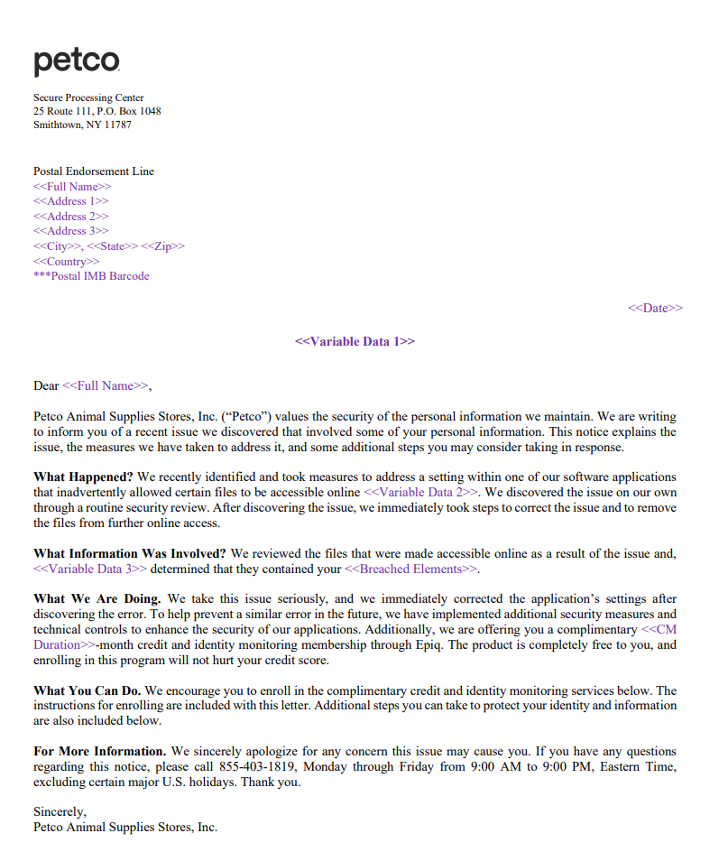
In it, you can see that Petco discovered that “a setting within one of our software applications … inadvertently allowed certain files to become accessible online.” Further, Petco said that it “immediately took steps to correct the issue and to remove the files from further online access,” and that it “corrected” the setting and implemented unspecified “additional security measures.”
So while no foul play appears to have been behind the breach, it’s still no less risky and concerning for Petco’s customers. We’ll cover what you can do about that in a moment after we cover yet another data issue at Petco through its Vetco clinics.
Also within the same timeframe, yet more research and reporting from Techcrunch uncovered a second security lapse that exposed personal info online. From their article:
“TechCrunch identified a vulnerability in how Vetco’s website generates copies of PDF documents for its customers.
“Vetco’s customer portal, located at petpass.com, allows customers to log in and obtain veterinary records and other documents relating to their pet’s care. But TechCrunch found that the PDF generating page on Vetco’s website was public and not protected with a password.
“As such, it was possible for anyone on the internet to access sensitive customer files directly from Vetco’s servers by modifying the web address to input a customer’s unique identification number. Vetco customer numbers are sequential, which means one could access other customers’ data simply by changing a customer number by one or two digits.”
What to do if you think you had info stolen in the Petco breach
With the size and reach of the Petco breach still unknown, and the impact of the Vetco security lapse also unknown, we advise caution for all Petco customers. At minimum, monitor transactions and keep an eye on your credit report for any suspicious activity. And it’s always a good time to update a weak password.
For those who received a notification, we advise the following:
Check your credit, consider a security freeze, and get ID theft protection. You can get all three working for you with McAfee+ Advanced or McAfee+ Ultimate.
Monitor transactions across your accounts, also available in McAfee+ Advanced and Ultimate.
Keep an eye out for phishing attacks. Use our Scam Detector to spot any follow-on attacks.
Update your passwords. Strong and unique passwords are best. Our password manager can help you create and store them securely.
And use two-factor authentication on all your accounts. Enabling two-factor authentication provides an added layer of security.
What to do if your Social Security number was breached.
If you think your Social Security number was caught up in the breach, act quickly.
- First, contact one of the three credit bureaus (Equifax, Experian, or TransUnion) and place a fraud alert on your credit report.
- That will cover all three bureaus and make it harder for someone to open new accounts in your name. You can also quickly freeze your credit altogether with McAfee+ Ultimate.
- Also notify the Social Security Administration (SSA) along with the Internal Revenue Service (IRS), and file a police report immediately if you believe your number is being misused.
The call center number that connects you to … scammers?
You might want to be careful when searching for customer service numbers while in AI mode. Or with an AI search engine. It could connect you to a scammer.
From The Times comes reports of scammers manipulating the AI in platforms like Google and Perplexity so that their search results return scam numbers instead of a proper customer service numbers for, say, British Airways.
How do they manipulate those results? By spamming the internet with false info that gets picked up and then amplified by AI.
“[S]cammers have started seeding fake call center numbers on the web so the AI is tricked into thinking it is genuine …
“Criminals have set up YouTube channels with videos claiming to help with customer support, which are packed with airline brand names and scam numbers designed to be scraped and reused by the AI.
“Bot-generated reviews on Yelp or video descriptions on YouTube are filled with fraudulent numbers as are airline and travel web forums.”
And with these tactics, scammers could poison the results for just about any organization, business, or brand. Not just airlines. Per The Times, “The scammers have also hijacked government sites, university domains, and even fitness sites to place scam numbers, which fools the AI into thinking they are genuine.”
This reveals a current limitation with many AI platforms. Largely they can’t distinguish when people deliberately feed them bad info, as seen in the case here.
Yet even as this attack is new, our advice remains the same: any time you want to ring up a customer service line, get the number directly from the company’s official website. Not from AI search and not by clicking a paid search result that shows up first (scammers can poison them too).
Is that a call from an FTC “agent?” If so, it’s a scam.
Are you under investigation for money laundering? Of course not. But this scam wants you to think so—and to pay up.
On Tuesday, the Federal Trade Commission (FTC) issued a consumer alert warning that people are reporting getting unexpected calls from someone saying they’re “FTC agent” John Krebs. Apparently “Agent Krebs” is telling people that they’re under investigation for money laundering—and that a deposit to a Bitcoin ATM can resolve the matter.
Of course, it’s a scam.
For starters, the FTC doesn’t have “agents.” And the idea of clearing one’s name in an investigation with a Bitcoin payment is a sure-fire sign of a scam. Lastly, any time someone asks for payment with Bitcoin or other payment methods that are near-impossible to recover (think wire transfers and gift cards), those are big red flags.
Apart from hanging up and holding on to your money, the FTC offers the following guidance, which holds true for any scam call:
- Never transfer or send money to anyone in response to an unexpected call or message, no matter who they say they are.
- Know that the FTC won’t ask for money. In fact, no government agency will ever tell you to deposit money at a cryptocurrency ATM, buy gift cards and share the numbers, or send money over a payment app like Zelle, Cash App, or Venmo.
- Don’t trust your caller ID. A call might look like it’s coming from the government or a business, but scammers often fake caller ID.
And we close things out a quick roundup …
As always, here’s a quick list of a few stories that caught our eye this week:
AI tools transform Christmas shopping as people turn to chatbots
National cybercrime network operating for 14 years dismantled in Indonesia
Why is AI becoming the go-to support for our children’s mental health?
We’ll see you next Friday with a special edition to close out 2025 … This Year in Scams.

Stay Updated
Follow us to stay updated on all things McAfee and on top of the latest consumer and mobile security threats.